
Accent Wall Visualizer: See an Accent Wall in Your Own Room
Upload a photo of your room, say which wall you mean, and describe the accent: a bold paint color, a color block, board and batten or shiplap. The AI changes that wall in your photo, next to your real furniture, floor and light, before you buy paint or trim.
Free account required. New accounts in most countries get free credits for up to 2 renders (watermarked), then paid plans.
Accent Wall Ideas Before and After
Every image below was made by AI with our own image model: the before rooms are generated sample rooms, and each after is an edit of its before. Under each pair is the exact instruction we used, plus what the AI did not do and what it changed that we did not ask for. We sent these instructions to that model directly. The tool runs different models (the default is AI Paint Visualizer Grok), so your results will differ.
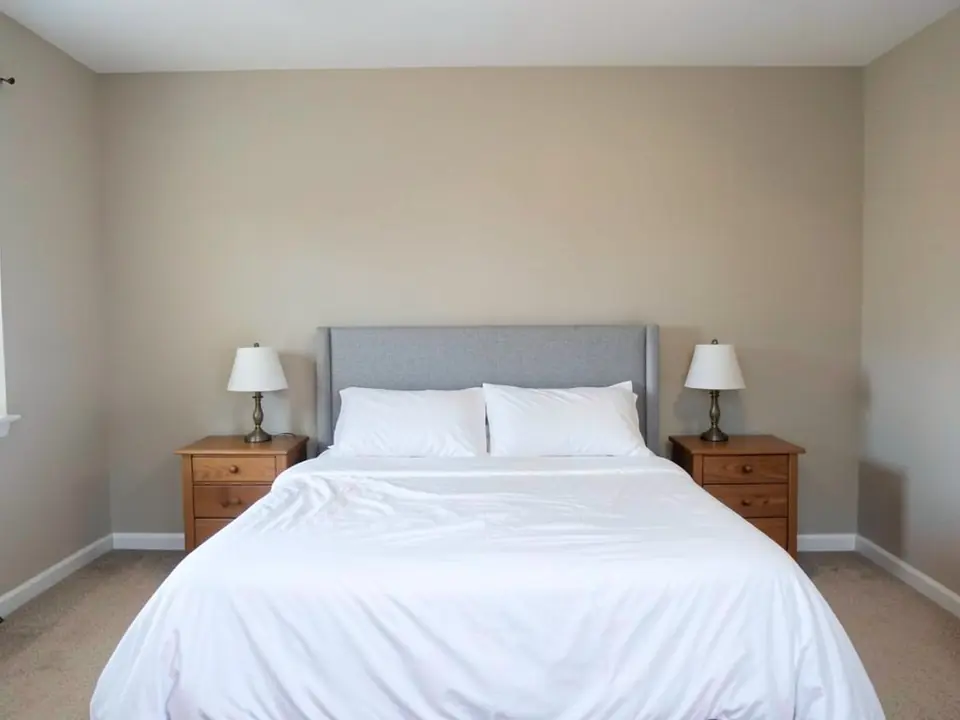 Before
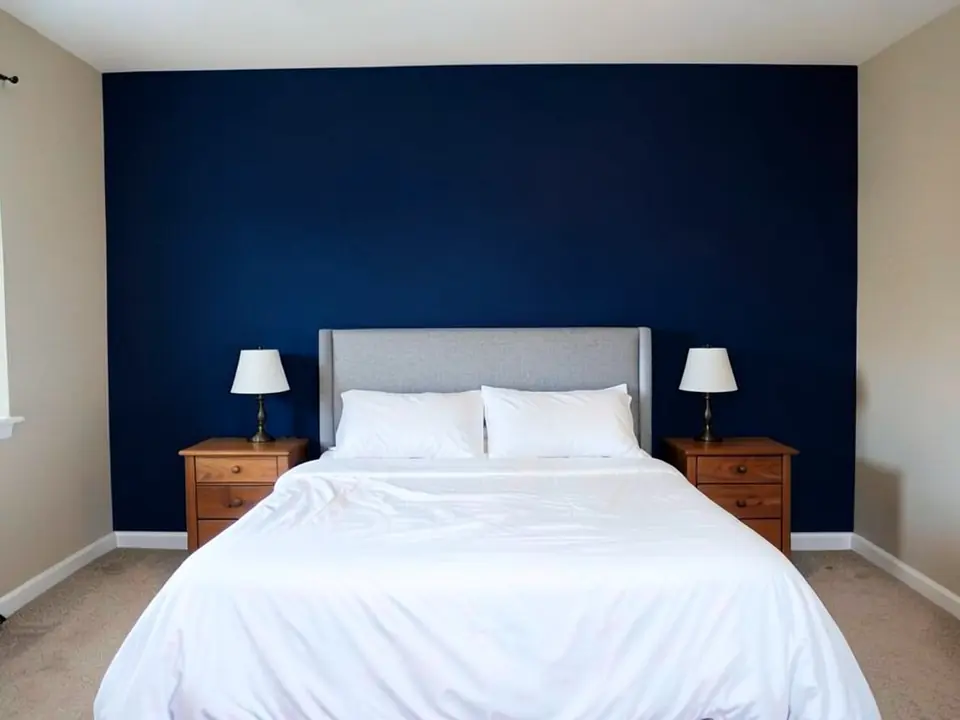 After
After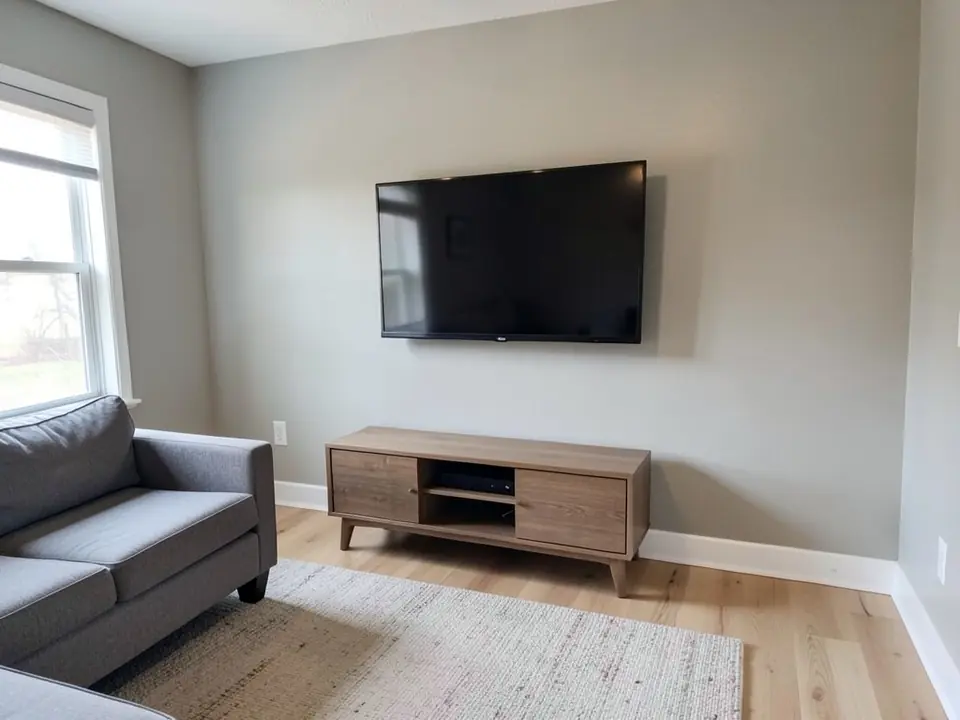 Before
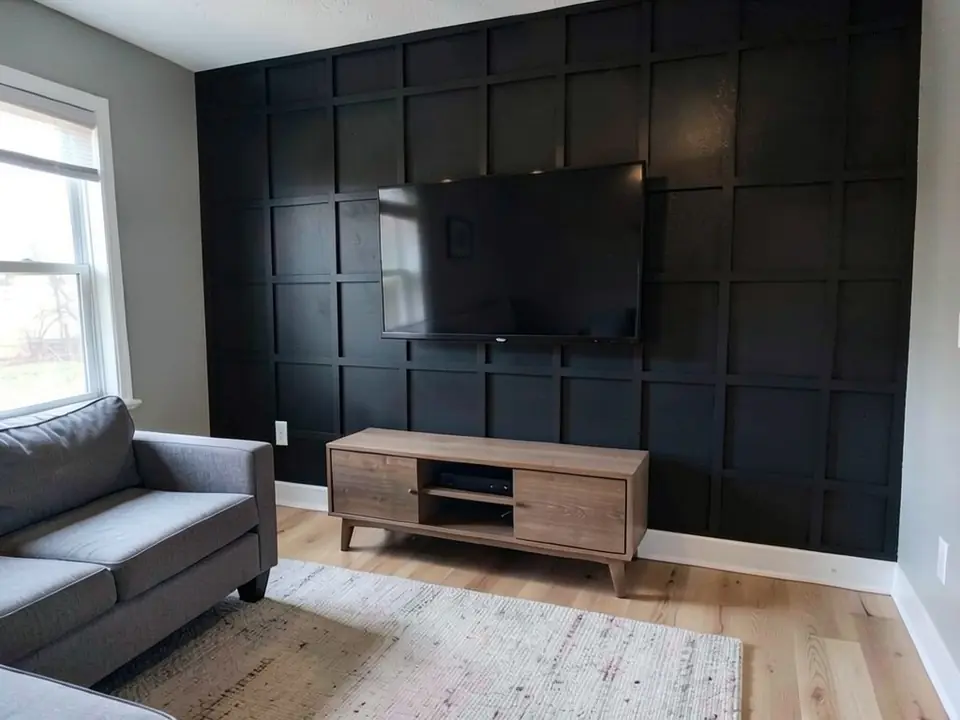 After
After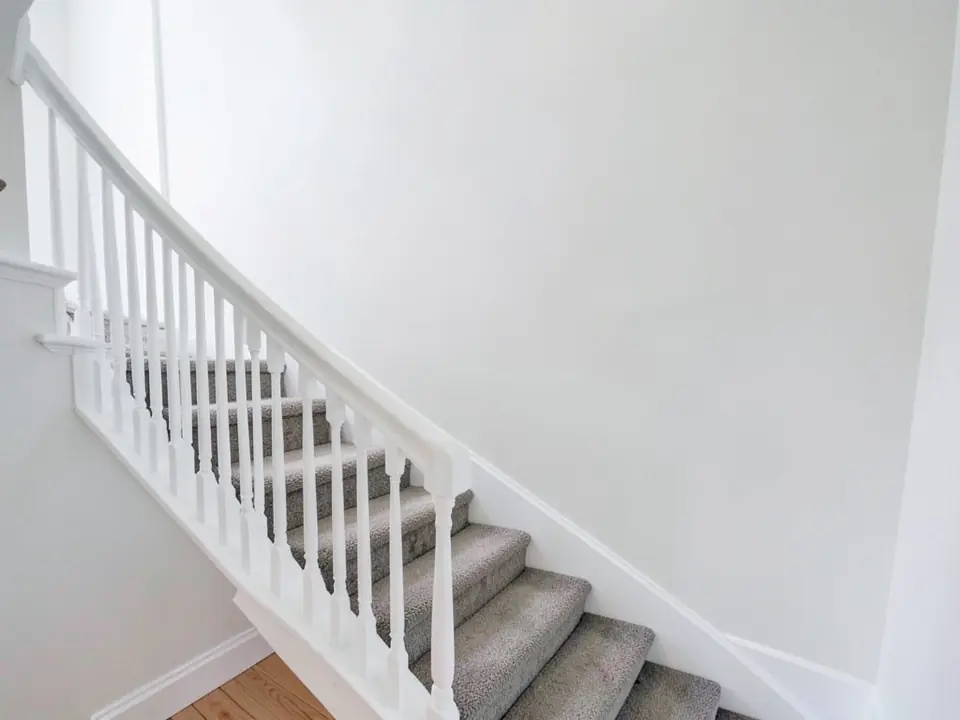 Before
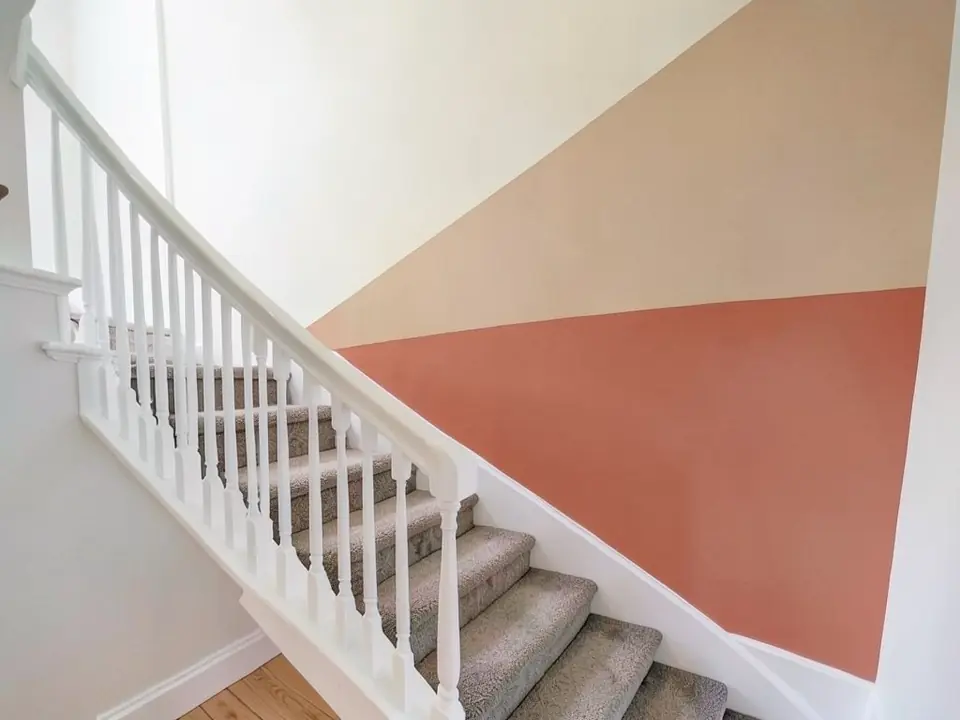 After
AfterHow to Try an Accent Wall on Your Own Photo
Use the paint tool's Custom mode. The Interior Paint mode takes a room type and one color and repaints the room, so it cannot be told to leave three walls alone. In Custom mode your own sentence becomes the instruction for the AI edit, which is what lets you pick one wall, name a pattern and protect everything else.
- Take one straight-on photo of the wall. Stand across the room, in daylight with the lights on, and get the whole wall from floor to ceiling. Move chairs, laundry and clutter out of the way.
- Open the paint tool and choose Custom. Under "Select Paint Mode", pick "Custom". In the "Custom Paint Requirements" box, name the wall by its position, say what to put on it, and list what must stay the same. Any of the three instructions above can be pasted as they are and edited.
- Upload the photo and generate. Add your photo under "Upload Image", leave the default AI model or pick another from the "AI Model" list (each shows its credit cost), then press "Generate Paint Design". You will be asked to sign in first if you have not.
- Compare a few versions. Change one thing at a time: the color, the pattern, the sheen. If a second wall changes, run it again and repeat the part that says which walls stay their original color.
Four Kinds of Accent Wall to Compare
Each card has a starting instruction you can paste into Custom mode and adapt. We have not rendered these four, so expect to adjust the wording.
One bold paint color
The simplest accent wall and the easiest to undo. Deep navy, charcoal, forest green and warm clay are common choices against white or beige walls.
Try: "Paint only the wall behind the sofa a dark forest green with a matte finish. Keep the other walls, the ceiling, the trim and all furniture exactly the same."
Board and batten or a square grid
Thin flat trim strips on the wall, painted the same color as the wall. It adds shadow lines and depth, and suits bedrooms, dining rooms and TV walls.
Try: "Add board and batten to only the wall behind the bed: tall vertical strips with a top rail at two thirds of the wall height, all painted dark gray. Keep the other walls and furniture the same."
Shiplap or vertical slats
Horizontal boards give a relaxed, cottage feel; narrow vertical slats look more modern and make a low room feel taller.
Try: "Cover only the TV wall in white horizontal shiplap boards. Keep the TV, the console, the floor and the other walls exactly the same."
Color block, two-tone or an arch
A painted shape instead of a full wall: a diagonal split on a stair wall, a lower half in a darker tone, or a painted arch behind a bed or desk.
Try: "Paint a tall arch shape in terracotta on the wall behind the desk, centered on the desk. Keep the rest of the wall white and everything else the same."
Choosing the Wall and the Color
- Pick the wall that is already the focus. The bed wall in a bedroom, the sofa or TV wall in a living room, the long wall of a stairwell. An accent on a wall nobody looks at is wasted paint.
- Look at what touches the wall. A gray headboard, a wood console or a white sofa will sit right against the new color. Render with your real furniture in the photo, not an empty room.
- Mind the light. A dark color on the window wall can look almost black in the daytime, because you see it against the glare. The same color on the wall facing the window shows its true tone.
- Match the undertone. Warm beige rooms tend to suit warm accents such as clay, olive or brown-based navy; cool white and gray rooms suit blue, charcoal and cool greens. If a color looks off in the render, try its warmer or cooler cousin.
- Choose the sheen on purpose. Flat and matte finishes hide dents and patches on a big wall; trim in satin or semi-gloss is easier to wipe. Dark colors over a light wall often need a tinted primer or an extra coat, so ask at the paint counter.
Want to repaint the whole room instead of one wall? The AI paint visualizer covers full-room colors, and the interior design tool restyles a whole room. Working on the outside of the house? Try the front door color visualizer.
What the AI Can and Cannot Do
It can show whether a color or a style feels right on your wall, next to your furniture and floor. It answers questions like "is navy too heavy behind a gray headboard?" or "does a black TV wall make the room feel smaller?" before you open a can of paint. Plain paint colors are the edits it gets right most often.
It cannot match a paint brand's exact color, and it does not measure anything. Board and batten spacing, slat widths and the angle of a color-block line are drawn by eye, and they can come out uneven, as two of our examples show. It sometimes changes more than you asked: another wall, the shade of the furniture or the texture of a surface. Each caption above names those changes for our examples.
It also cannot see the wall itself: dents, old patches, moisture or how many coats a dark color will need. Use the render to decide on a direction, then confirm it with a real sample on the wall and a tape-measured layout for any trim.
Accent Wall Visualizer FAQ
Which wall should be the accent wall?+
Usually the wall your eye lands on first when you walk in: the wall behind the bed, the wall behind the sofa, the TV wall, or a wall that already has a feature such as a fireplace or a window seat. A tall stair wall or the far end of a hallway also works, because it is seen from a distance. Avoid a wall broken up by several doors and windows; there is too little of it left to read as one block of color.
Can I try board and batten, shiplap or a color block, not just paint?+
Yes. In Custom mode you describe the wall in your own words, so you can ask for board and batten, a square grid, shiplap, vertical slats, a two-tone wall with a chair-rail line, a painted arch or a diagonal color block. Paint colors are the most reliable edit. Patterns are harder for the AI: spacing can come out uneven, as in our board and batten example, so treat a pattern render as a mood check and plan the real layout with a tape measure.
Do accent walls have to be dark?+
No. What makes an accent wall work is contrast with the other walls, not darkness. Navy, charcoal, forest green and black are popular because they contrast with white or beige rooms, but a soft sage, a warm clay or even a lighter tone in a dark room can do the same job. Render a dark option and a gentler one side by side and see which still looks right next to your floor and furniture.
How accurate are the colors?+
Treat the render as a preview, not a color match. The AI keeps the light in your photo, but it has no paint maker's color chart, and your phone camera, screen and room lighting all shift what you see. Use the visualizer to choose a color family and a style, then paint a large sample patch or a sample board on the real wall and look at it in the morning and the evening before you buy the full amount.
What photo works best?+
A straight-on photo in daylight, taken from across the room, with the whole accent wall in view from floor to ceiling and as little furniture in front of it as possible. Hold the phone level so the wall edges look straight, turn on the room lights, and avoid wide-angle shots that bend the corners. A photo where the chosen wall fills most of the frame also makes it easier for the AI to tell which wall you mean.
Why did the AI paint more than one wall?+
It happens, especially when two walls of the same color meet in a corner. In our own tests, a bedroom photographed at an angle came back with a side wall and the window wall painted navy too, even though the instruction named only the wall behind the bed. What helped: describing the wall by its position ("the wall behind the headboard"), saying which walls must stay their original color, and using a straight-on photo where the accent wall fills most of the frame. If it still happens, run it again; each render is a new attempt.
Can I paint the ceiling or trim too?+
Yes. Custom mode takes whatever you write, so you can ask for the ceiling, the baseboards, the door trim or the window frames in a different color along with the accent wall. Change one thing per render so you can tell what each choice does. To restyle a whole room around the new wall, the interior design tool is the better fit.
Is the accent wall visualizer free, and do I need to sign up?+
You need a free account to generate. You can sign in with Google or with a one-time code sent to your email. New accounts in most countries get enough free credits for up to 2 renders, and free renders carry a small watermark. New accounts in India do not get free credits. Paid plans on the pricing page give more renders without the watermark.
Try an Accent Wall in Your Room
One photo, one sentence about the wall, and a version to compare before you buy paint or trim.