
Pickleball Court Colors, Shown on a Photo of Your Court
Upload a photo of your pickleball court and describe the colors you have in mind: blue with a green border, a two-tone kitchen, gray, green or purple. The AI recolors the court surface in your photo, next to your real fence, trees and buildings, so your club, board or family can compare schemes before you resurface.
Free account required. New accounts in most countries get free credits for up to 2 renders (watermarked), then paid plans.
Pickleball Court Colors Before and After
Every image below was made by AI with our own image model: the before photos are AI-drawn stand-in courts, not photos of real courts, and each after is an edit of its before. Under each pair is the exact instruction we used, plus what the AI did not do and what it changed that we did not ask for. We sent these instructions to that model directly, not through this tool. The tool runs different models (the default is AI Paint Visualizer Grok), so your results will differ.
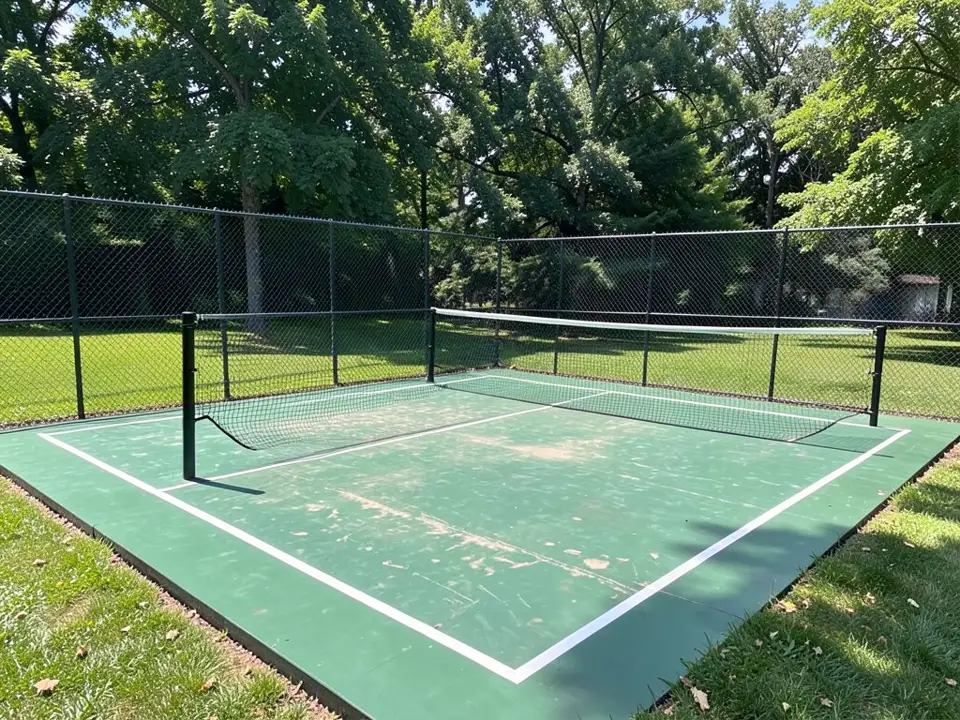 Before
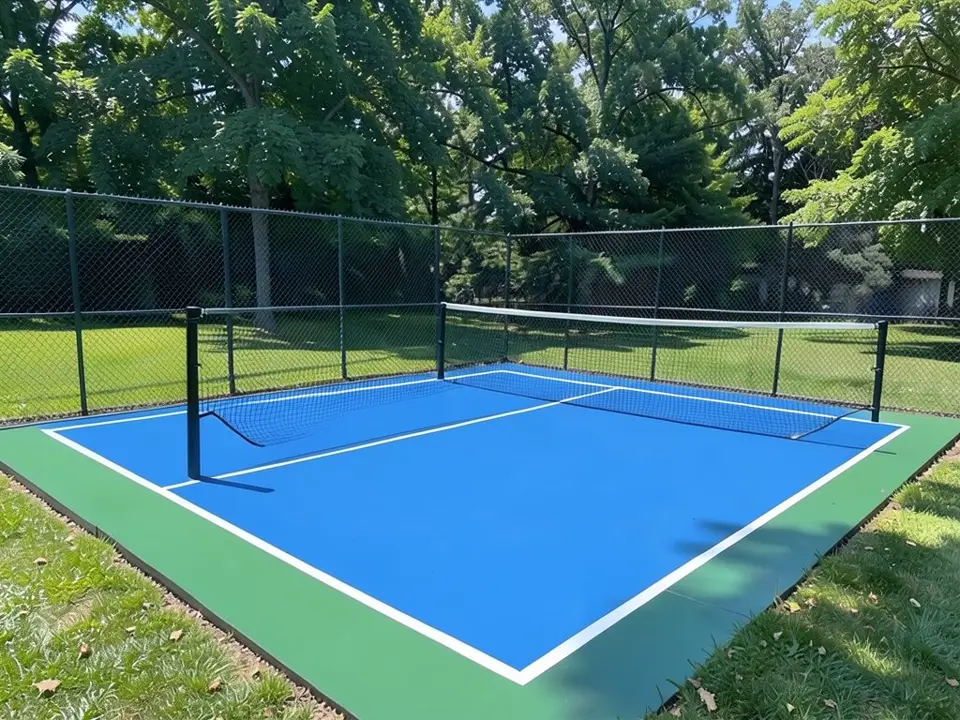 After
After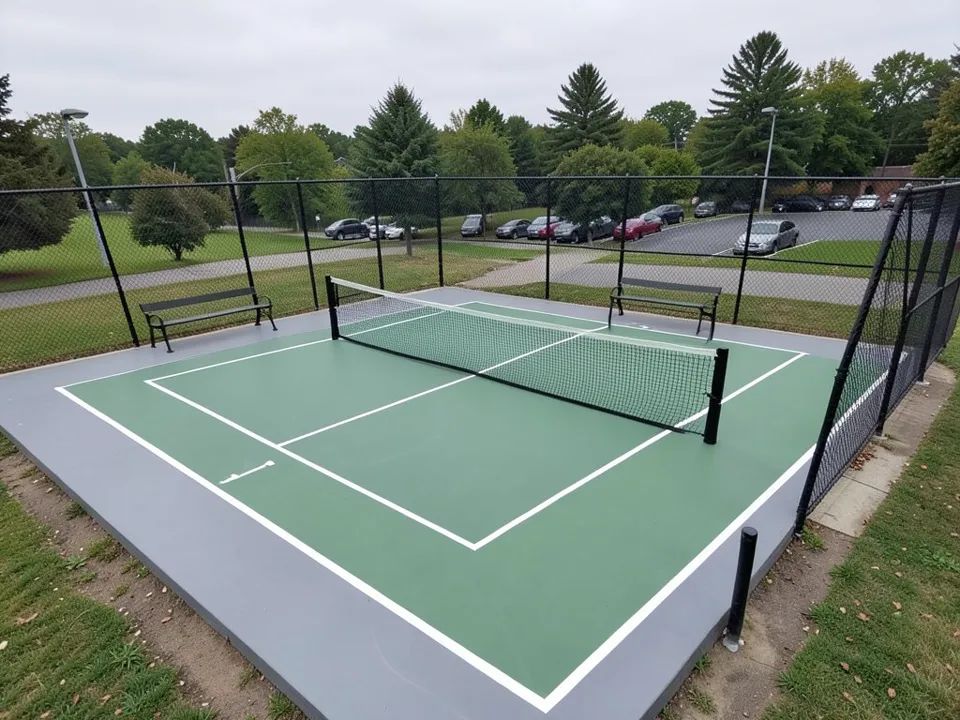 Before
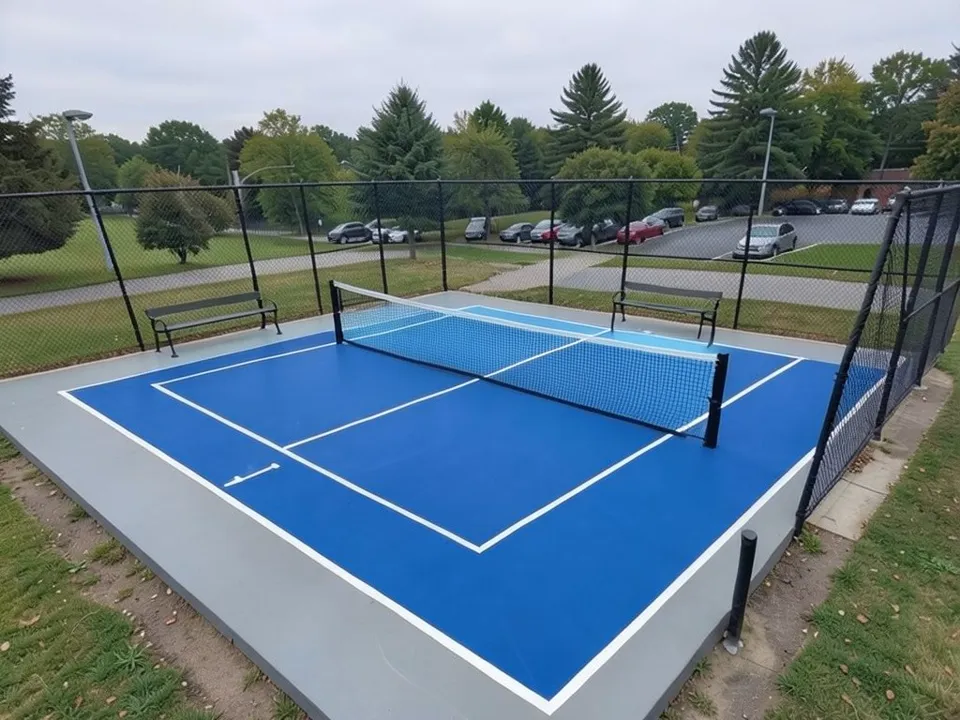 After
After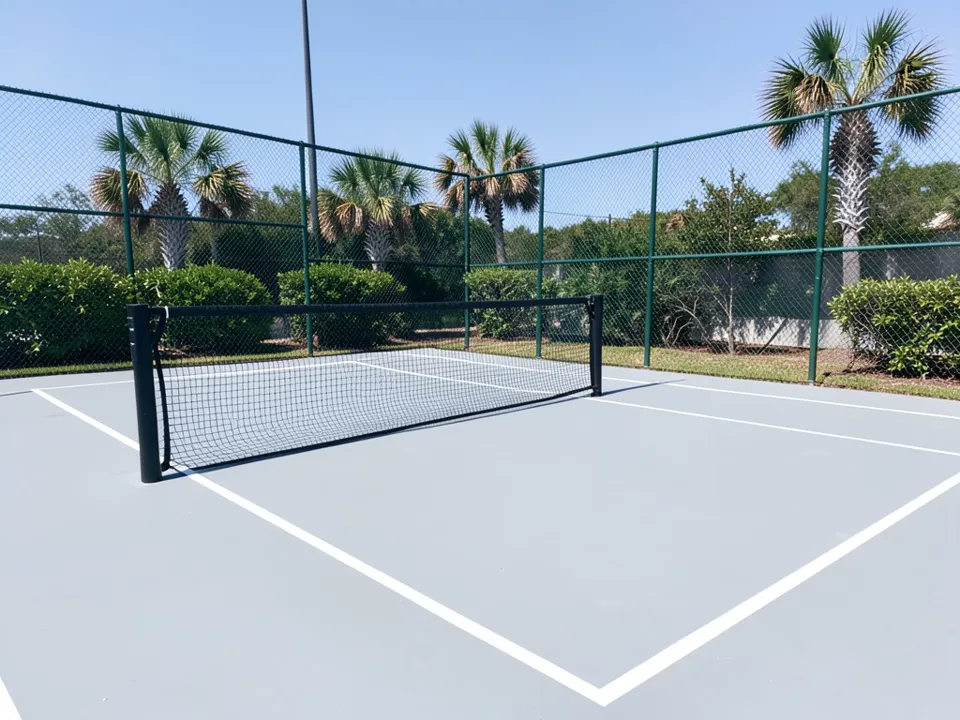 Before
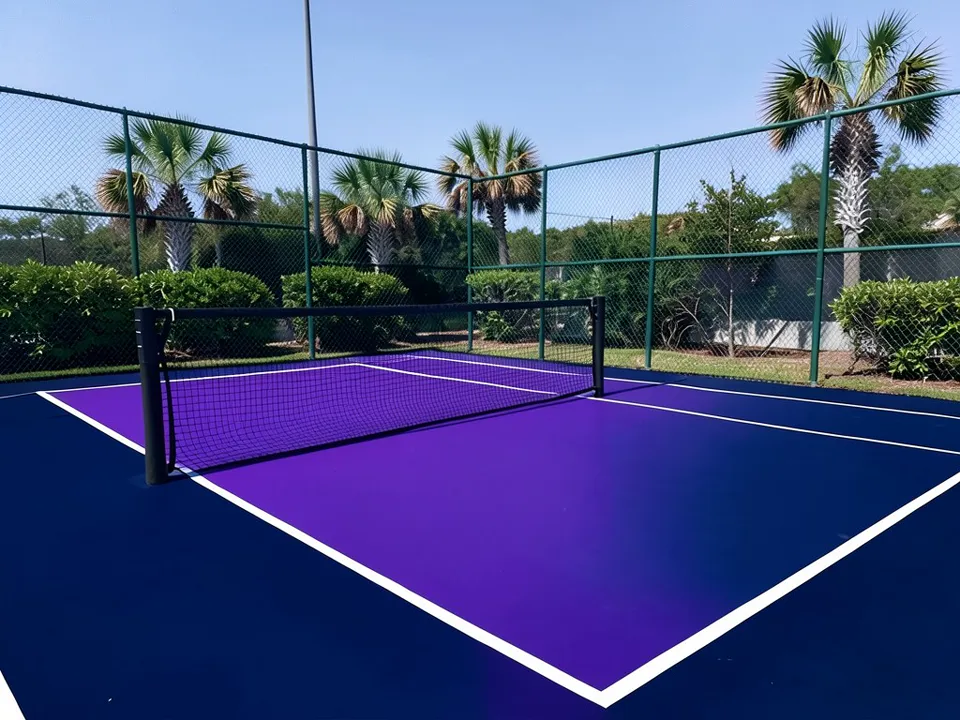 After
AfterHow to Preview New Colors on Your Own Court
Use the paint tool's Custom mode. The Exterior Paint and Interior Paint modes take one color and repaint a whole house or room, so they cannot be told to recolor only the court and keep the lines, net and fence. In Custom mode your own sentence becomes the instruction for the AI edit.
- Take one clear photo of the court. Shoot in daylight from a corner or from behind the baseline, with the whole court, the net and both kitchens in view. A slightly raised spot, such as a bench or a step, shows more of the surface.
- Open the paint tool and choose Custom. Under "Select Paint Mode", pick "Custom". In the "Custom Paint Requirements" box, say "recolor only the court surface", give one color per zone (playing area, kitchen, border), and list what must stay the same: the white lines, the net, the posts, the fence and everything around the court.
- Upload the photo and generate. Add your photo under "Upload Image", leave the default AI model or pick another from the "AI Model" list (each shows its credit cost), then press "Generate Paint Design". You will be asked to sign in first if you have not.
- Compare a few versions. Change one thing at a time: the border, then the kitchen, then the main color. If the AI moves a line, recolors the fence or paints the wrong strip, run it again and repeat the list of what stays the same.
Five Court Color Combinations to Compare
Each card has a starting instruction you can paste into Custom mode and adapt. We have not rendered these five, so expect to adjust the wording.
Blue inside, green border
A familiar blue and green look. A medium blue playing area inside a green border stands out from the fence line, and it suits a park or a backyard with a lawn around it.
Try: "Recolor only the court surface: medium blue inside the white lines, medium green outside the lines. Keep every white line, the net, the posts and the fence exactly the same."
Blue court, lighter kitchen
A two-tone court with the kitchen in a lighter or different color, so players can see the non-volley zone at a glance. Name the kitchen clearly, because the AI may put the second color on the wrong strip.
Try: "Main court surface medium blue. Only the kitchen on both sides of the net, between the net and the kitchen line, light blue. Keep the border, the lines, the net and the fence the same."
Blue with a gray border
A calmer, more neutral frame around a blue court. Gray borders sit well next to concrete paths and buildings, and a light gray is one of the lighter options for a sunny site.
Try: "Recolor only the court surface: blue inside the white lines, light gray outside the lines. Keep every white line, the net, the posts, the fence and the surroundings the same."
Green on green
A lighter green inside a darker green, or the reverse. It blends into a garden and is the classic tennis-court look. Check your ball against it, since some balls stand out less on green.
Try: "Recolor only the court surface: light green inside the white lines, darker green outside. Keep the lines, the net, the posts, the fence, the lawn and the trees the same."
Purple, red or club colors
Bold schemes for a club, a school or a private court that wants its own look. They are usually darker, so think about sun and heat, and test the ball contrast in the render.
Try: "Recolor only the court surface: purple inside the white lines, dark blue outside. Keep every white line, the net, the posts and the fence exactly the same."
What to Weigh Before You Pick a Scheme
A render is a preview, not a color sample. The AI paints a color onto your photo; it does not know the coating maker's exact shades, and screens show color differently. Use the render to pick a direction, then ask your contractor for physical samples of two or three colors and look at them on site, in the light the court gets when people play.
Check the edit against your photo. The AI can keep the lines, net and fence when you ask, but our own examples show it can also drop shade, lighten a border or paint the wrong strip. Compare the two images side by side before you share a render with your group.
- Ball contrast. Think about the ball your group plays with most. A yellow ball and an orange ball do not stand out equally on every color, so hold one up next to the render.
- Sun and heat. Darker colors absorb more of the sun than lighter ones. On a court in full sun in a hot place, a lighter scheme is the safer choice; in shade or a cooler climate you have more freedom.
- The kitchen. A kitchen in its own color makes the non-volley zone easy to see. If you want one, say "only the kitchen" in the instruction and name the line that bounds it.
- The setting. The court sits next to a fence, trees, a house or a parking lot. A bright scheme that looks good on a chart can feel loud next to a garden; the render shows it in your real setting.
Want to change more than the court? The landscape design tool restyles the yard around it, the exterior design tool restyles a house next to the court, and our sister site has an AI landscape design app for planting around the fence.
Pickleball Court Colors FAQ
What are the most common pickleball court colors?+
Blue and green with white lines. Guides do not agree on which zone gets which color. A pickleball guide from Forwrd describes the standard court as a blue kitchen, a green playing area and white lines, while other courts put blue across the whole playing area inside a green border. Either way, blue and green is the look most players know.
Does USA Pickleball require certain court colors?+
According to the Forwrd guide, USA Pickleball does not mandate specific court colors. That leaves clubs, parks and homeowners free to choose. If your court hosts sanctioned events, ask the organizer what they expect before you commit.
Do court colors affect how well players see the ball?+
Yes, contrast matters. The Forwrd guide says your court colors should give the most contrast against the ball your players use most. It also notes that orange balls disappear against blue faster than yellow ones, and suggests a warmer green playing area if your group plays with orange balls. Look at your own balls against the render before you decide.
Should the kitchen be a different color?+
It can be. The Forwrd guide says blue is the most common kitchen color, mentions red kitchens at some indoor pro venues, and says any color that clearly sets the non-volley zone apart from the rest of the court does the job. A two-tone court is mostly a choice of look and of how easily players spot the kitchen at a glance.
Do dark court colors make the court hotter?+
Dark colors take in more of the sun. The Forwrd guide says dark surfaces absorb solar radiation, advises lighter surface colors for hot climates, and names dark navy, forest green and black as colors that fall short there. In a cooler or shaded spot this matters less. Ask your coating maker which of their colors they recommend for full sun.
How many court colors can I choose from?+
It depends on the coating maker. Sportmaster offers 18 standard court colors in its online pickleball designer, with names that run from Ice Blue and Dove Gray to Tournament Purple and Brite Red, and it warns that light sources and the time of day can change how colors look. Other makers have their own ranges, so ask your contractor which line they use and get physical samples.
Will the AI keep my lines, net and fence?+
Often, but not every time. In our examples, made with our own model rather than through this tool, it kept the white lines, nets, posts and fences, but it also lost tree shade, lightened a gray border and put a color on the wrong strip. List everything that must stay the same in your instruction, compare the render with your photo, and run it again if something moved.
Is this court color preview free, and do I need to sign up?+
You need a free account to generate. You can sign in with Google or with a one-time code sent to your email. New accounts in most countries get enough free credits for up to 2 renders, and free renders carry a small watermark. New accounts in India do not get free credits. Paid plans on the pricing page give more renders without the watermark.
Try New Colors on Your Pickleball Court
One photo, one sentence about the colors, and a version to compare before you resurface.