
Metal Building Color Visualizer for a Photo of Your Building
Upload a photo of your steel building, pole barn, shop or barndominium and describe the scheme you are considering. The AI recolors the wall panels, trim, roof and wainscot on your real building, before you order.
Free account required. New accounts in most countries get free credits for up to 2 renders (watermarked), then paid plans.
Metal Building Colors Before and After
Every image below was made by AI with our own image model: the before photos are generated sample scenes, and each after is an edit of its before. Under each pair is the exact instruction we used, plus what the AI did not do and what it changed that we did not ask for. We sent these instructions to that model directly, not through this tool. The tool runs different models (the default is AI Paint Visualizer Grok), so your results will differ.
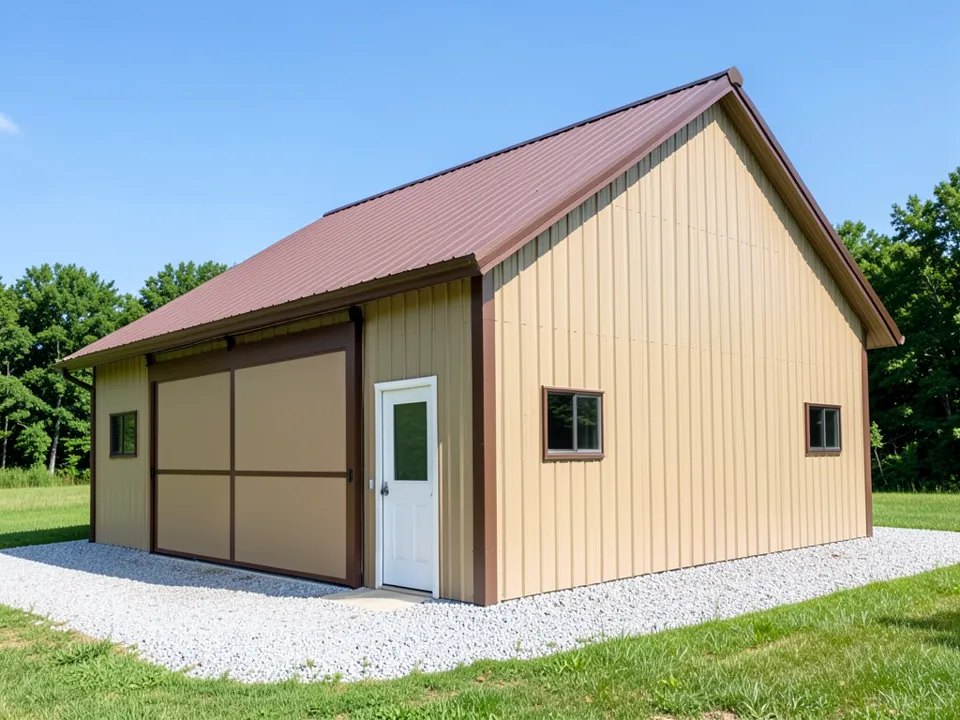 Before
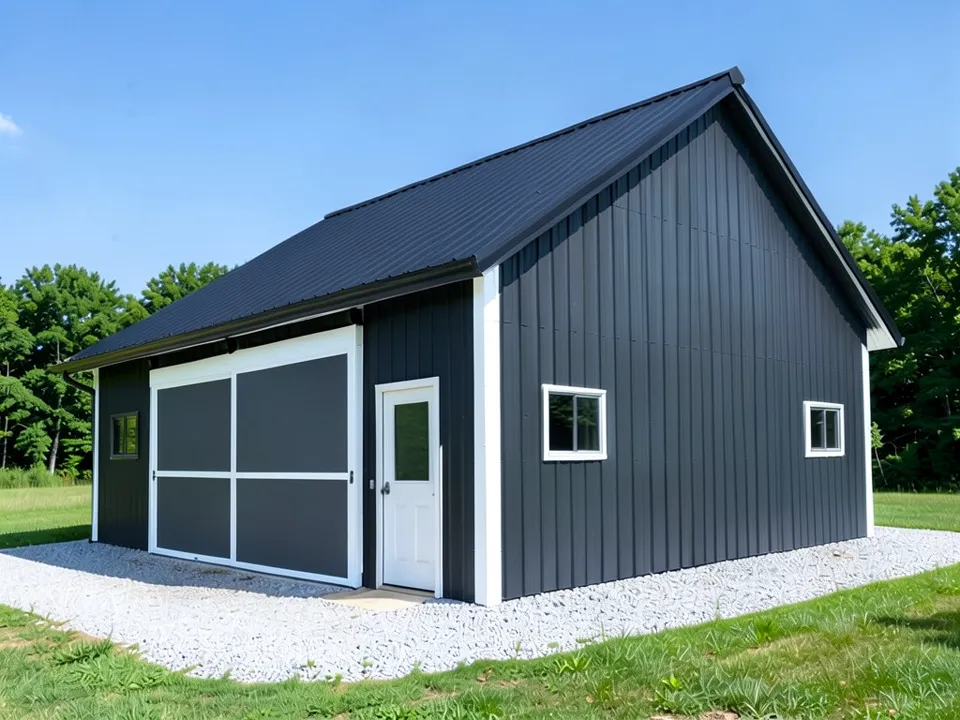 After
After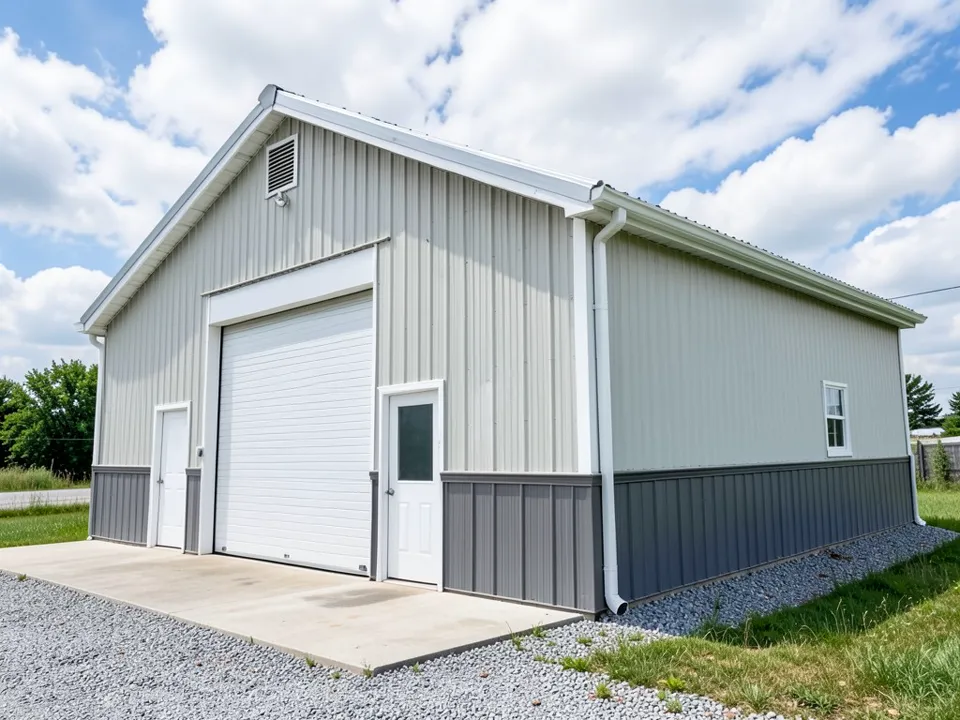 Before
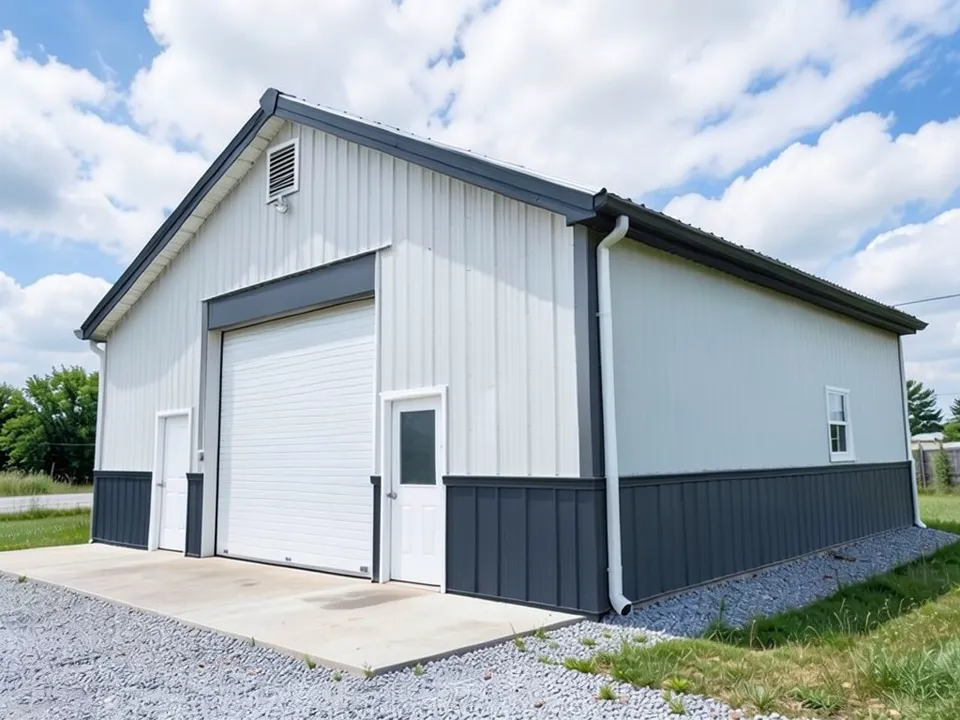 After
After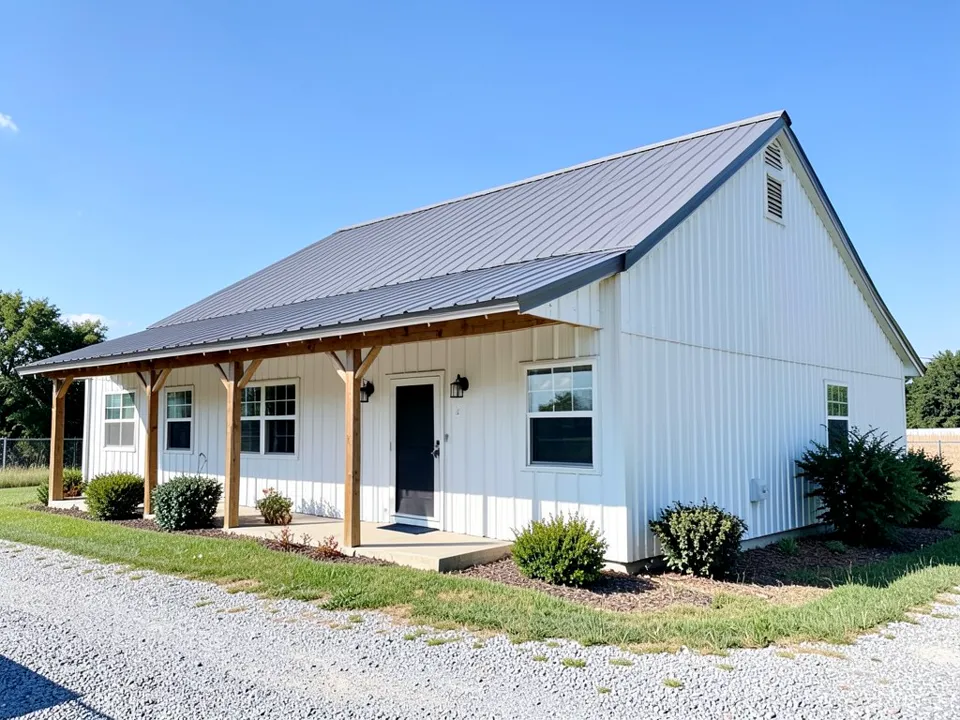 Before
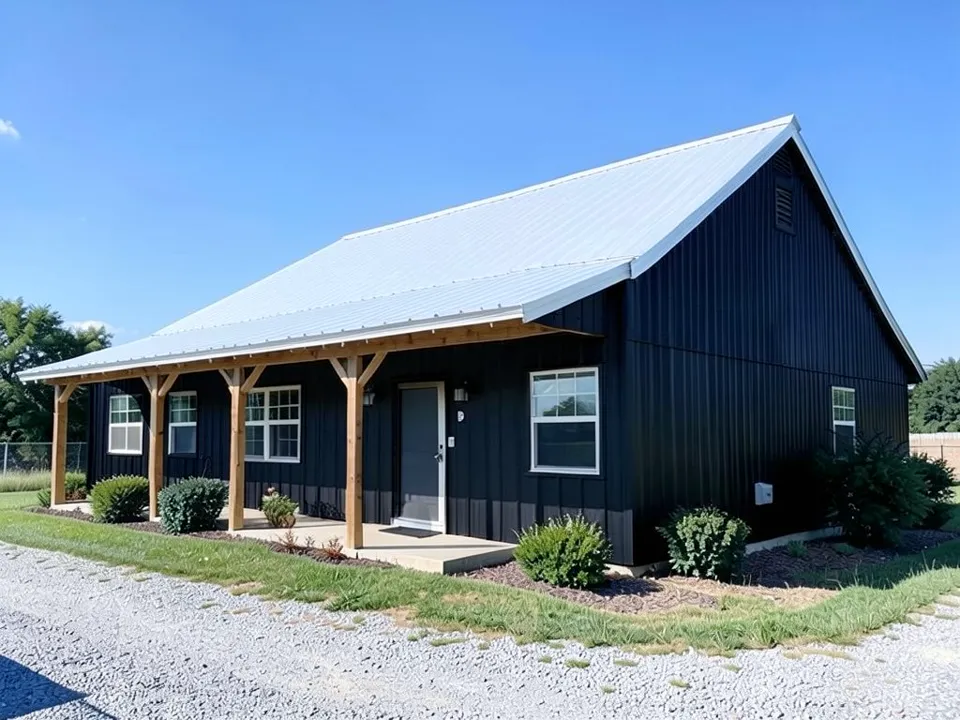 After
AfterHow to Try Colors on Your Own Metal Building
Use the paint tool's Custom mode. The Exterior Paint mode takes one color for the whole building, so it cannot give the walls, trim and roof different colors. In Custom mode your own sentence is the instruction, so you can name each surface and protect everything else.
- Take one clear photo. Shoot in daylight from a corner, so two walls, the roof and the trim are all in view.
- Open the paint tool and choose Custom. Under "Select Paint Mode", pick "Custom". In the "Custom Paint Requirements" box, give one color per surface (wall panels, trim, roof, wainscot, doors) and list what must stay the same: the ribbed panel lines, doors, windows and the ground.
- Upload the photo and generate. Add your photo under "Upload Image", leave the default AI model or pick another from the "AI Model" list (each shows its credit cost), then press "Generate Paint Design". You will be asked to sign in first if you have not.
- Compare a few schemes. Change one surface at a time, such as white and then dark trim. If the AI changes something you wanted kept, run it again and repeat what must stay the same.
Walls, Roof, Trim and Wainscot: Naming Each Surface
A steel building carries at least three colors. The wall panels set the look. The roof takes the most sun. The trim runs along the corners, eaves, gable edges and openings and gives the building its outline. Many buildings add a wainscot, a darker band along the bottom few feet of the wall that hides mud splash and scuffs.
The AI only knows what you name. "Paint the building charcoal" leaves it to guess about the trim and roof; "paint the wall panels charcoal, the trim white and the roof galvalume silver" does not. Say where trim goes if it matters: in our pole barn example the AI whitened the corner trim but left the eave trim dark.
The metal-buildings.org color guide suggests choosing the walls first, then the roof, then the trim, the cheapest place to change your mind.
Four Metal Building Color Schemes to Compare
Each card has an instruction you can paste into Custom mode and adapt. We have not rendered these four, so expect to adjust the wording.
Charcoal with white trim
The modern look. White trim outlines dark walls, and a light or silver roof stays cooler in a sunny climate.
Try: "Paint the wall panels charcoal, the trim white and the roof galvalume silver; keep the ribbed panel lines, doors, windows and gravel exactly the same."
Barn red with white trim
The classic farm scheme. Reds run from muted brick to bright red, so name the shade you mean.
Try: "Paint the wall panels a deep, muted barn red, the corner, eave and door trim white and the roof light gray; keep the ribbed panel lines, the doors, the windows and the ground exactly the same."
Black with wood accents
The barndominium look: black walls with wood posts or a wood door, under a lighter roof.
Try: "Paint the wall panels and the trim black and make the roof light gray; keep the wood porch posts and beams, the white windows, the doors, the lawn and the driveway exactly the same."
Tan with a brown wainscot
A warm rural scheme. The darker band along the bottom hides mud splash and mower scuffs.
Try: "Paint the upper wall panels tan, the wainscot band along the bottom of the walls dark brown and all the trim dark brown; keep the wainscot line at the same height and keep the roof, the doors, the windows and the ground exactly the same."
Choosing Metal Building Colors for Your Site
- Contrast the trim with the walls. Light trim on dark walls, or dark on light, gives the building edges. Matching trim looks modern but loses the outline.
- Think about sun. In a hot climate a lighter roof is the usual advice. Insulation decides how much heat from dark panels reaches the inside.
- Think about dirt. Mid-tone grays, tans and browns hide dust and mud better than white or black.
- Look at what stands next to it. A building beside a house should suit the house. Render with the house in the frame if you can.
- Keep it simple. Three colors, or four with a wainscot, is the usual limit before a building looks busy.
- Recolor what is there. Asking the AI for a wainscot your building does not have is inventing, not recoloring, and the result is less reliable.
Source for the scheme and climate guidance on this page: the metal building colors guide at metal-buildings.org, read in October 2026. Your supplier's chart and warranty are the final word.
Painting the house as well? The AI paint visualizer covers wall and siding colors, the exterior design tool restyles a whole home, and the brick paint visualizer helps with a brick house.
What the AI Can and Cannot Do
It can show a color scheme on your own building, next to your house, trees and driveway, and answer questions like "does white trim beat charcoal on these gray walls?" before you order.
It cannot show a supplier's exact color. This is not a supplier color chart: a name like "charcoal" is drawn the way the AI imagines it, and screens distort color too. Order physical color chips and look at them outdoors in daylight before you decide.
It recolors an existing building; it does not design a new one. It will not change the size, roof pitch or doors on purpose, and if you have not built yet, a photo of a similar building shows that building, not yours. It also sometimes changes more than you asked: in our examples it redrew a sliding door, darkened a door frame and a gable vent, recolored roof-edge trim, shifted one picture slightly and changed the gravel, as each caption says.
Metal Building Color Visualizer FAQ
What is the most popular metal building color?+
Gray. The color guide at metal-buildings.org lists charcoal and light gray as the most requested, followed by barn red, black and earth tones such as brown and tan, with white trim as the most common partner.
What trim color goes with a gray metal building?+
Most gray buildings get white trim, which draws a sharp line around every edge. On pale gray walls, dark trim in charcoal or black feels more current. If the walls are already charcoal, trim in the same shade makes the building read as one solid block, with no edges picked out. (Based on the metal-buildings.org color guide.)
Should the roof be lighter or darker than the walls?+
Where summers are hot, go lighter on the roof, since it faces the sun all day. In cooler areas either works; a dark roof over light walls is the classic look. Just avoid two shades so close they read as one. (Based on the metal-buildings.org color guide.)
Which colors fade the least, and what is SMP vs Kynar?+
According to metal-buildings.org, muted and earth-toned colors (browns, bronzes, tans, classic greens, light grays and white) hold up best, while bright reds and blues get looser fade limits on coating warranties. SMP is the standard finish on most metal buildings; PVDF, sold as Kynar 500, resists fading and chalking better and costs more. Ask your supplier for the written fade allowance for your color.
Does a black metal building get hotter?+
The panels get hotter at the surface, because black reflects the least sunlight. How much of that heat reaches the inside depends mostly on insulation and ventilation, according to metal-buildings.org. If you like black walls, a lighter roof keeps the surface that takes the most sun cooler.
Can my HOA or county restrict the color?+
It can. An HOA, a historic district or a county zoning rule may limit what colors a building can be, so ask before you place the order. Bring a render to that conversation if it helps, but it does not count as permission.
Will the colors on screen match the supplier's chart?+
No. Screens and indoor light distort color, and an AI render is an approximation of a color you describe in words, not a supplier's exact shade. Before you order, ask for physical color samples and look at them outdoors in daylight.
Is the metal building color visualizer free, and do I need to sign up?+
You need a free account to generate. You can sign in with Google or with a one-time code sent to your email. New accounts in most countries get enough free credits for up to 2 renders, and free renders carry a small watermark. New accounts in India do not get free credits. Paid plans on the pricing page give more renders without the watermark.
Try a Color Scheme on Your Building
One photo, one sentence per surface, and a version to compare before you order.