
Concrete Stain Visualizer for Patios, Walkways and Floors
Upload a photo of your concrete patio, front walkway or indoor slab and describe the stain you are considering: a mottled acid-stain brown, an even charcoal gray, a terra cotta or a sealed basement floor. The AI changes the color of the concrete in your photo, next to your real house, lawn and furniture, before you buy stain or hire a crew.
Free account required. New accounts in most countries get free credits for up to 2 renders (watermarked), then paid plans.
Concrete Stain Before and After
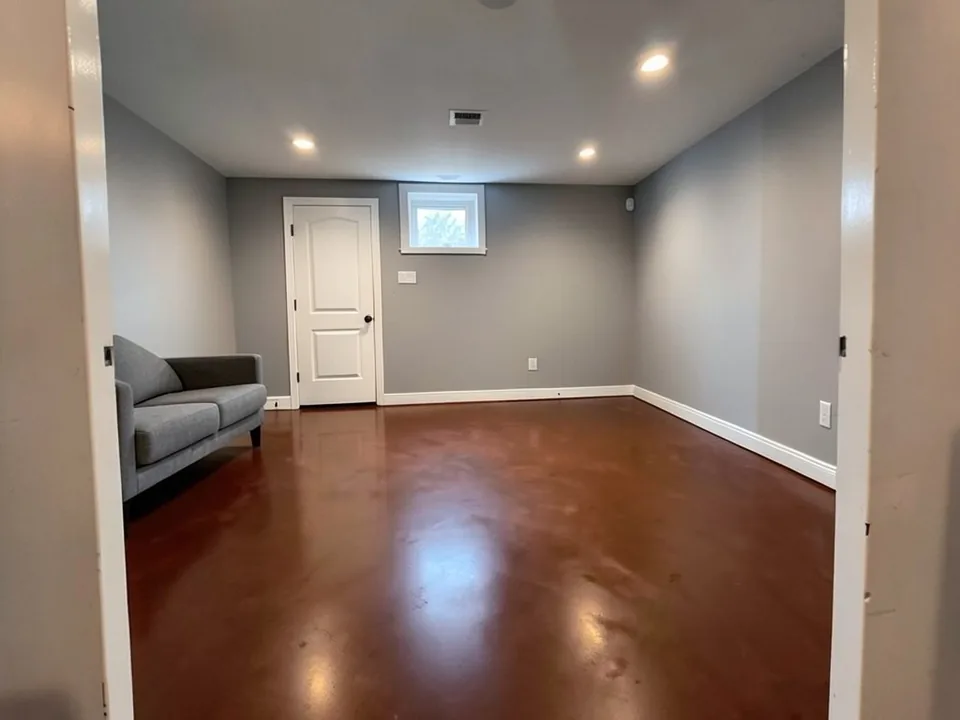
Every image below was made by AI with our own image model: the before photos are generated sample scenes, and each after is an edit of its before. Under each pair is the exact instruction we used, plus what the AI did not do and what it changed that we did not ask for. We sent these instructions to that model directly, not through this tool. The tool runs different models (the default is AI Paint Visualizer Grok), so your results will differ.
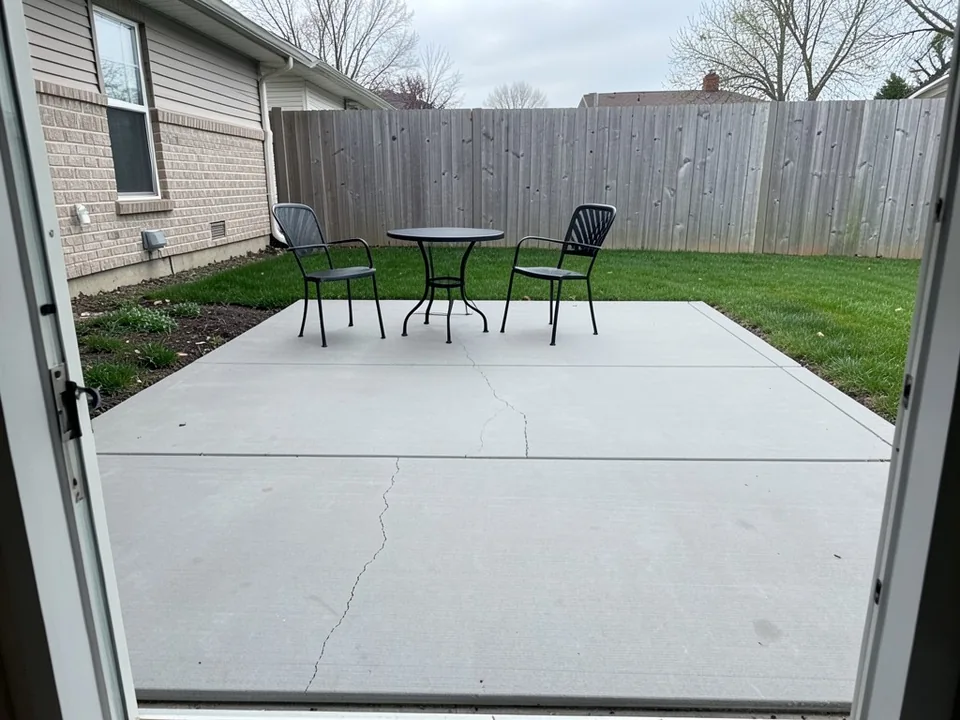 Before
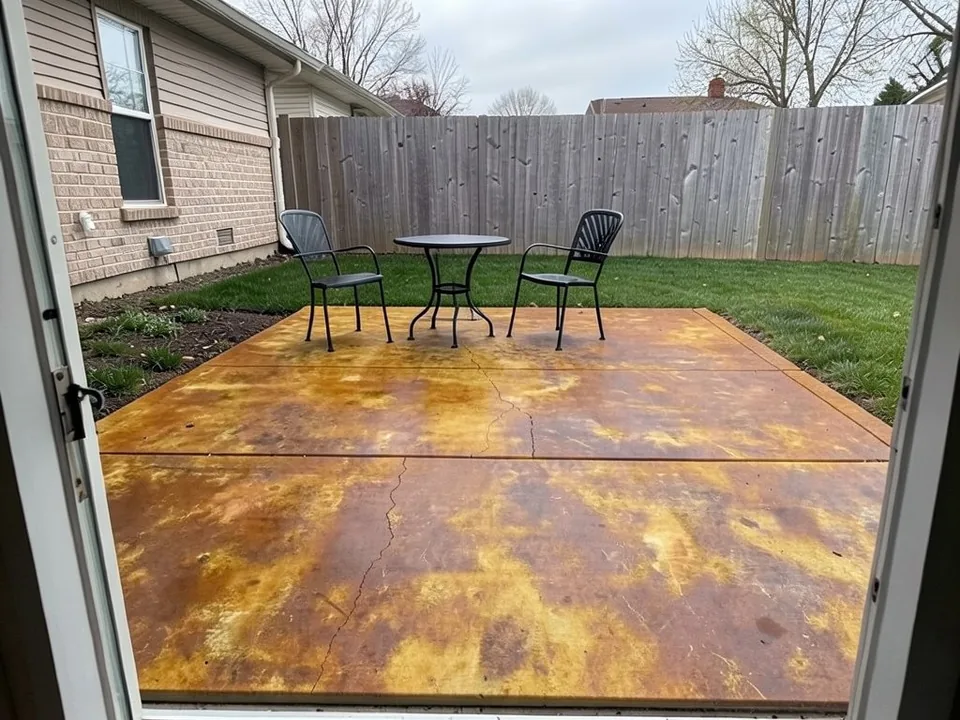 After
After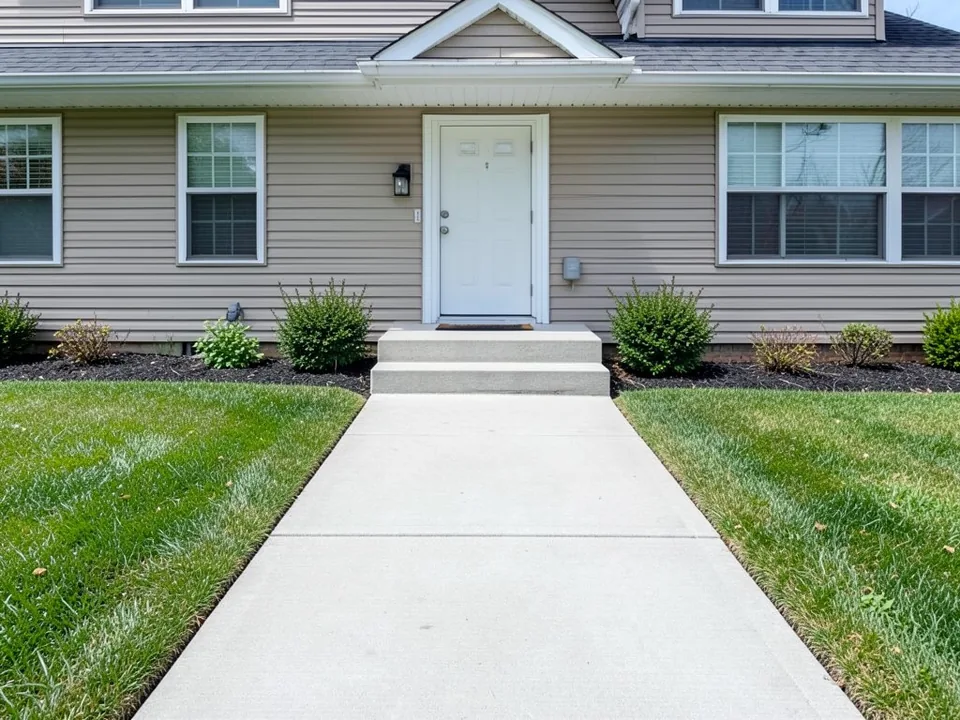 Before
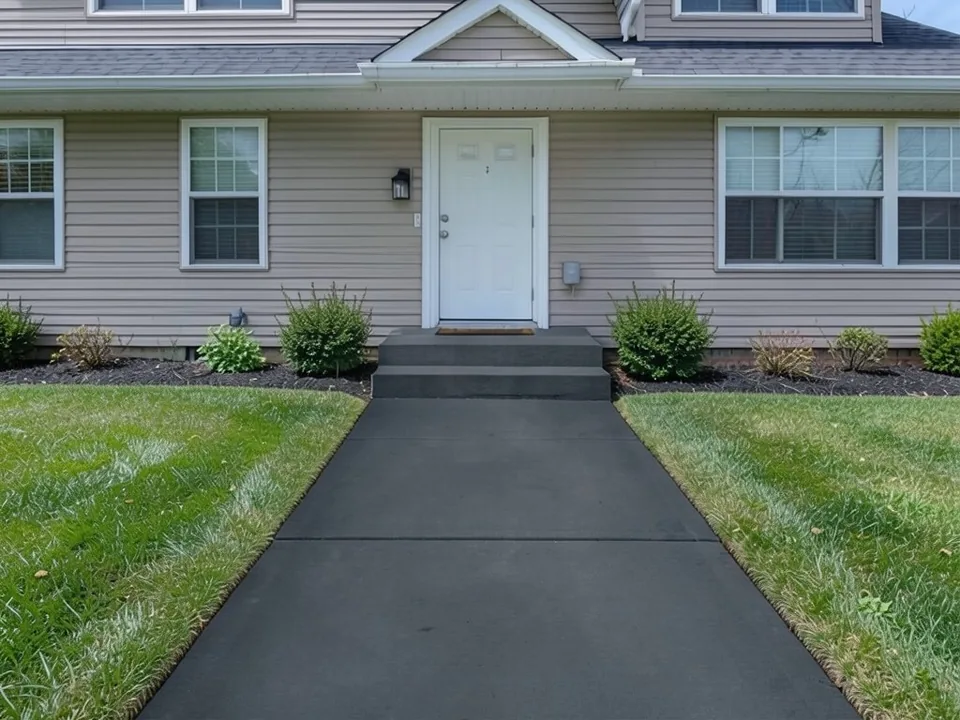 After
After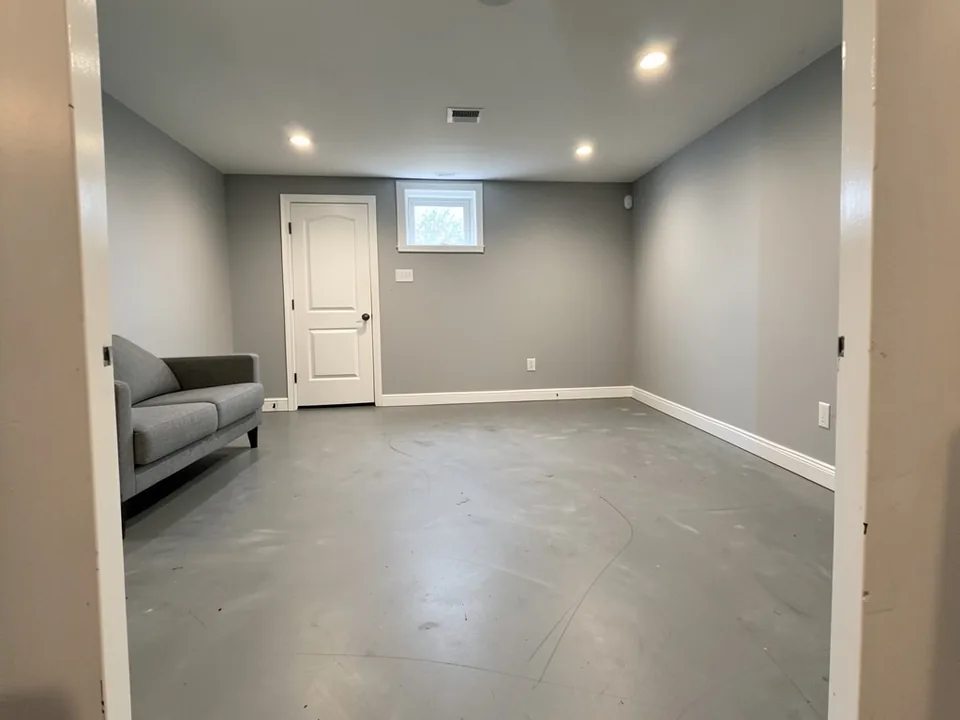 Before
 After
AfterHow to Preview a Stain Color on Your Own Concrete
Use the paint tool's Custom mode. The Exterior Paint and Interior Paint modes take one color and repaint the house or the room, so they cannot be told to stain only the slab. In Custom mode your own sentence becomes the instruction for the AI edit, which is what lets you name the concrete, describe the stain and protect everything else.
- Take one clear photo of the concrete. Shoot in daylight, from standing height or a doorway, with the whole slab in view. Move cars, grills, planters and mats off it if you can.
- Open the paint tool and choose Custom. Under "Select Paint Mode", pick "Custom". In the "Custom Paint Requirements" box, name the concrete surface, describe the stain color and how see-through it is, say what must stay visible (joints, cracks, texture) and list what must stay the same. Any of the three instructions above can be pasted as they are and edited.
- Upload the photo and generate. Add your photo under "Upload Image", leave the default AI model or pick another from the "AI Model" list (each shows its credit cost), then press "Generate Paint Design". You will be asked to sign in first if you have not.
- Compare a few versions. Change one thing at a time: the color, how mottled it is, matte or sealed shine. If the AI changes the house or the furniture, run it again and repeat the part that lists what stays the same.
Acid Stain or Water-Based Stain: What to Describe
Acid-based stain reacts with the minerals in the concrete. The result is translucent and variegated, with lighter and darker patches like natural stone, and every slab comes out a little different. The color range is narrow: browns, tans, amber and terra cotta. In your instruction, words like "mottled", "variegated" and "translucent" describe this look.
Water-based stain does not react; it fills the pores. It gives a more even, predictable color and a much wider range, including grays, charcoal, greens, blues and reds. Words like "even", "uniform" and "semi-transparent" describe this look.
Both are see-through, unlike a concrete paint or a solid-color coating. That means the color of your concrete, its texture and any repairs all show in the finished job. If your slab is dark gray, a light stain will not lighten it much. Ask the AI for a translucent stain and look closely at whether the render still shows your slab's surface; if it looks like a solid coat, it is showing you a coating, not a stain.
Four Concrete Stain Looks to Compare
Each card has a starting instruction you can paste into Custom mode and adapt. We have not rendered these four, so expect to adjust the wording.
Warm earth tones
Browns, tans, terra cotta and amber: the classic acid-stain range. They suit brick, wood fences and warm-colored houses.
Try: "Stain only the concrete patio a translucent terra cotta with soft mottled variation, matte finish. Keep the furniture, the lawn, the house and the fence exactly the same."
Grays and charcoal
A cool, modern look that goes with gray siding, black trim and white houses. A lighter gray stain can also even out a blotchy slab without a strong color.
Try: "Stain only the concrete walkway a semi-transparent medium gray, so the broom texture and joints still show. Keep the house, the steps, the plants and the lawn exactly the same."
Two-tone border
One color in the field and a darker band along the edges or the saw-cut joints. It frames a patio or a large indoor floor and needs only careful masking.
Try: "Stain the concrete patio a light tan, with a darker brown band about one foot wide along all its outer edges. Keep everything else in the photo exactly the same."
Sealed indoor floor
A basement, studio or shop floor stained in brown, gray or a deep color, then sealed for a soft sheen.
Try: "Stain only the concrete floor a dark espresso brown with a satin sealer sheen. Keep the walls, the baseboards, the furniture and the ceiling exactly the same."
Choosing a Concrete Stain Color
- Start from the house. The slab sits next to your siding, brick, trim and roof. Warm browns and terra cotta go with red brick and wood; grays and charcoal go with gray, white or black exteriors. Render with the house in the photo, not a close-up of bare concrete.
- Look at your concrete first. Stain adds color on top of what is there. Dark gray cement limits light and bright colors, and patches, cracks and old stains will still show.
- Think about sun and use. Dark colors in full sun can get hot underfoot, and a glossy sealer can be slippery when wet. A pool deck or a shaded entry may need a different choice than a covered patio.
- Decide on the sheen. The sealer, not the stain, sets the final look: matte, satin or wet look. Our patio example came out glossy though we did not ask for it, so say the sheen you want in the instruction.
- Test on the real slab. Stain on a small hidden spot first and let it dry; acid stain in particular can look very different from the label once it reacts with your concrete.
Painting the house too? The AI paint visualizer covers wall and siding colors, the exterior design tool restyles the whole outside, and the brick paint visualizer helps if the patio sits next to a brick wall.
What the AI Can and Cannot Do
It can show whether a stain color feels right on your patio, walkway or floor, next to your house, lawn and furniture. It answers questions like "does a brown stain clash with the gray siding?" or "is charcoal too dark for the front walk?" before you buy a single container.
It cannot predict how a real stain will react with your concrete. Acid stain in particular depends on the cement, its age and the weather, and a stain maker's color chart is only a guide. The AI also tends to make stain look more solid and smoother than it really is: in our examples it hid the scuff marks on a basement floor and most of the broom texture on a walkway, while a real translucent stain shows them. It sometimes changes more than you asked, such as the sheen, a doormat or a small detail on the house. Each caption above names those changes for our examples.
It also cannot see what is on or in the slab: an old sealer that will block the stain, oil spots, moisture or weak patches. Use the render to choose a color direction, then confirm it with a test spot on the real concrete.
Concrete Stain Visualizer FAQ
What is the difference between acid stain and water-based stain?+
Acid-based stain reacts chemically with the concrete, so it gives translucent, mottled color that can look like stone or marble, and no two slabs come out the same. Its colors are limited to earthy browns, tans and terra cottas, and it needs to be neutralized and rinsed after it reacts. Water-based stain does not react: it soaks into the pores and gives a more even, predictable color in a much wider range, from earth tones to grays, blues and reds, and it is easier to apply. In the visualizer you can describe either look in your instruction.
Will concrete stain hide cracks and patches?+
No. Stain is translucent, so it shows the surface underneath and often makes cracks, patches and old stains stand out more, not less. Patched areas can soak up stain differently and come out a different shade. Repair and clean the slab first, and expect the old marks to stay visible. Be careful with the AI here: in our basement example it erased the scuff marks on the floor, which a real stain would not do.
Which stain colors are common for outdoor patios?+
Earthy tones are the classic choice outdoors: browns, tans, terra cotta and amber, which are also the colors acid stain can make. Grays and charcoal suit modern houses and gray siding. Water-based stains add greens, blues and other colors if you want something less expected. Two things limit your choice: dark gray concrete makes light and bright colors hard to reach, and very dark colors in full sun can get hot underfoot. Render two or three options on your own photo before you buy.
Can I preview stain on my driveway or garage floor?+
Yes, Custom mode works on any photo, so you can upload a driveway or garage floor and ask for a stain color. This page is about stain color only: the AI does not resurface, stamp or repair the concrete. If you want to stain a driveway, check that the stain and the sealer you pick are rated for car traffic, because some decorative stains are not.
Do I need to seal stained concrete?+
Usually yes, and outdoors almost always. A sealer protects the color from wear and weather and sets the final sheen, from matte to wet-look gloss. Acid stain and water-based stain often call for different sealers, so follow the stain maker's instructions. Sealers wear and need to be reapplied every few years. Note that an old sealer already on the slab can block new stain, so it has to be removed first.
What photo works best?+
A daylight photo with the whole slab in view and nothing parked or piled on it. Shoot from a standing height or a doorway, not straight down, so the AI can see where the concrete ends and the lawn, mulch or walls begin. Avoid hard shadows across the slab and wet concrete, which already looks darker. If the slab is very long, a photo of the part you care about most is better than a distant shot.
Why did the AI change more than the concrete, or erase cracks?+
Image models redraw the whole picture, so small changes outside the slab happen: in our examples the view shifted slightly, a doormat changed color, a cable appeared on a wall and a dry slab came out glossy. The AI also tends to smooth the surface, which can wipe out cracks, scuffs and texture that a real stain would show. What helps: say that the joints and cracks must stay visible, list everything that must stay the same, and run it again if needed. Each render is a new attempt.
Is the concrete stain visualizer free, and do I need to sign up?+
You need a free account to generate. You can sign in with Google or with a one-time code sent to your email. New accounts in most countries get enough free credits for up to 2 renders, and free renders carry a small watermark. New accounts in India do not get free credits. Paid plans on the pricing page give more renders without the watermark.
Try a Stain Color on Your Concrete
One photo, one sentence about the stain, and a version to compare before you buy.