
See Epoxy Floor Colors on a Photo of Your Own Garage
Upload your own garage or basement floor, describe the coating in plain words, and the AI recoats the floor in your photo: flake blends, solid colors or metallic swirls, next to your real walls, cabinets and doors.
Free account required. New accounts in most countries get free credits for up to 2 renders (watermarked), then paid plans.
Epoxy Garage and Basement Floors Before and After
Every image below was made by AI with our own image model: the before rooms are generated sample spaces, and each after is an edit of its before. The instruction asked for a new floor only, and each caption names what else the AI touched.
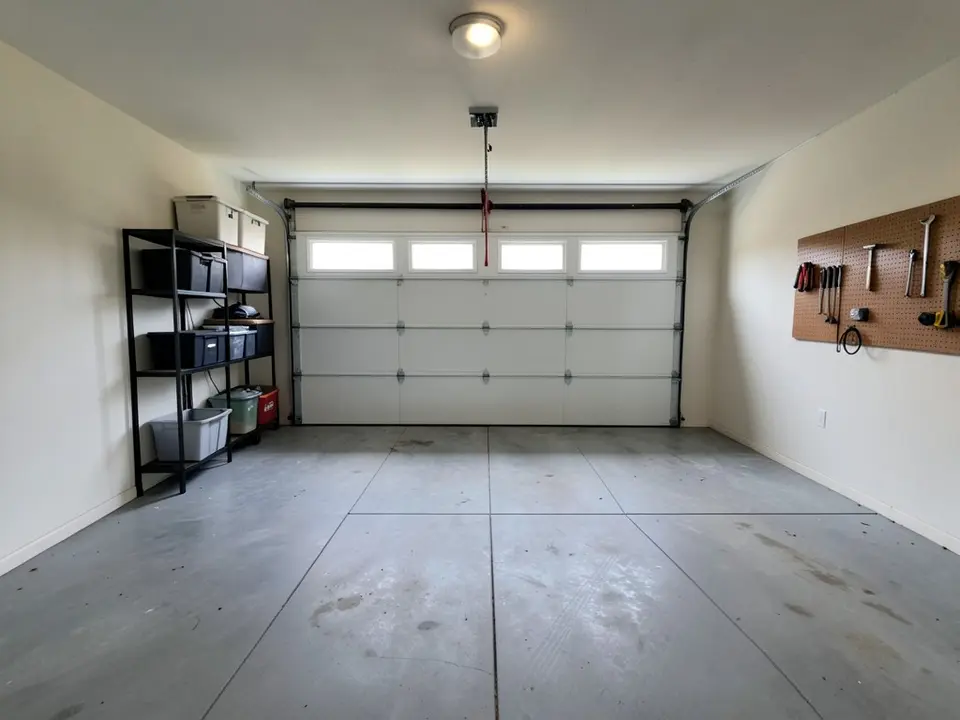 Before
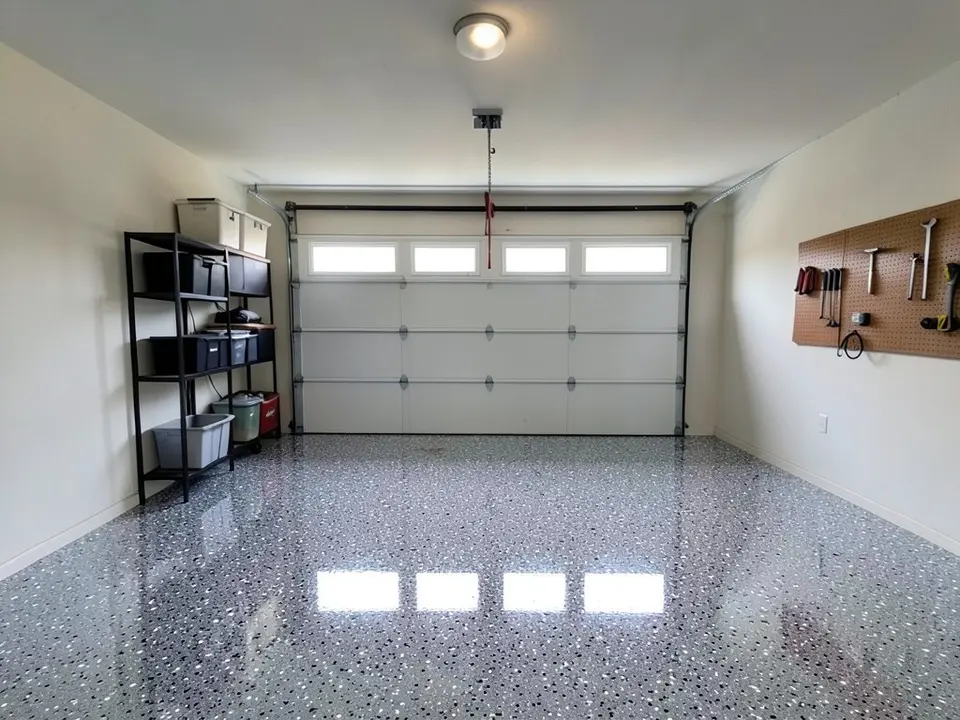 After
After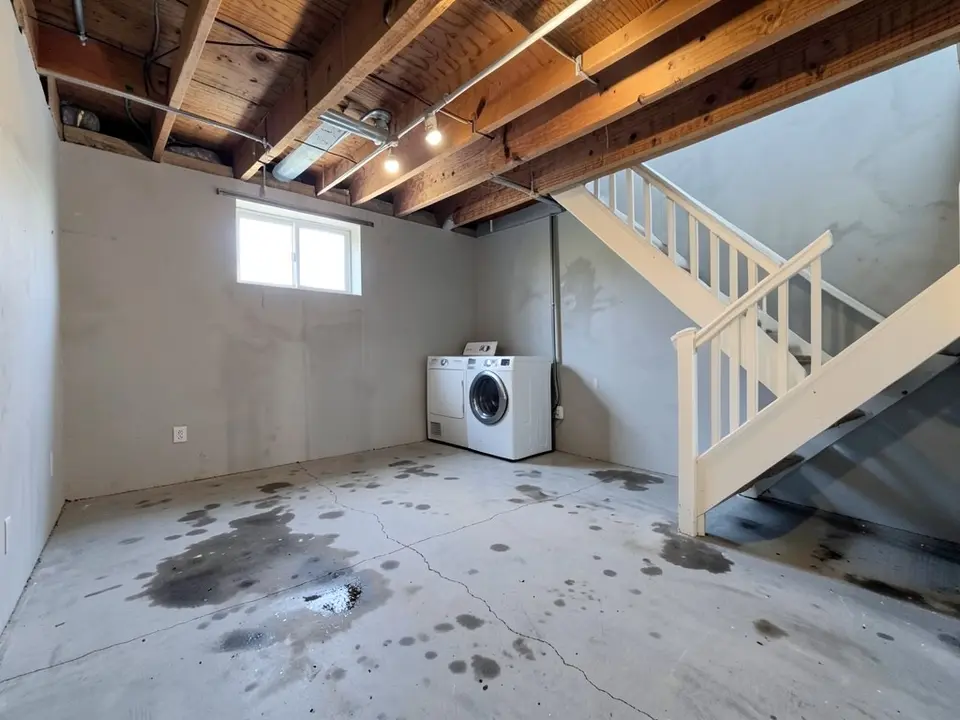 Before
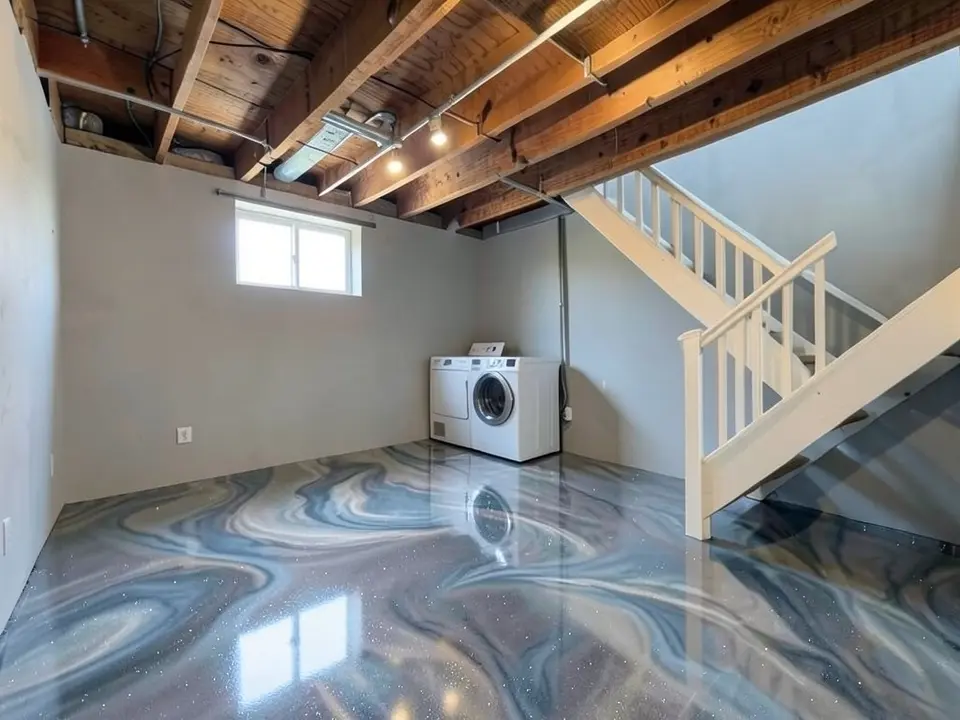 After
After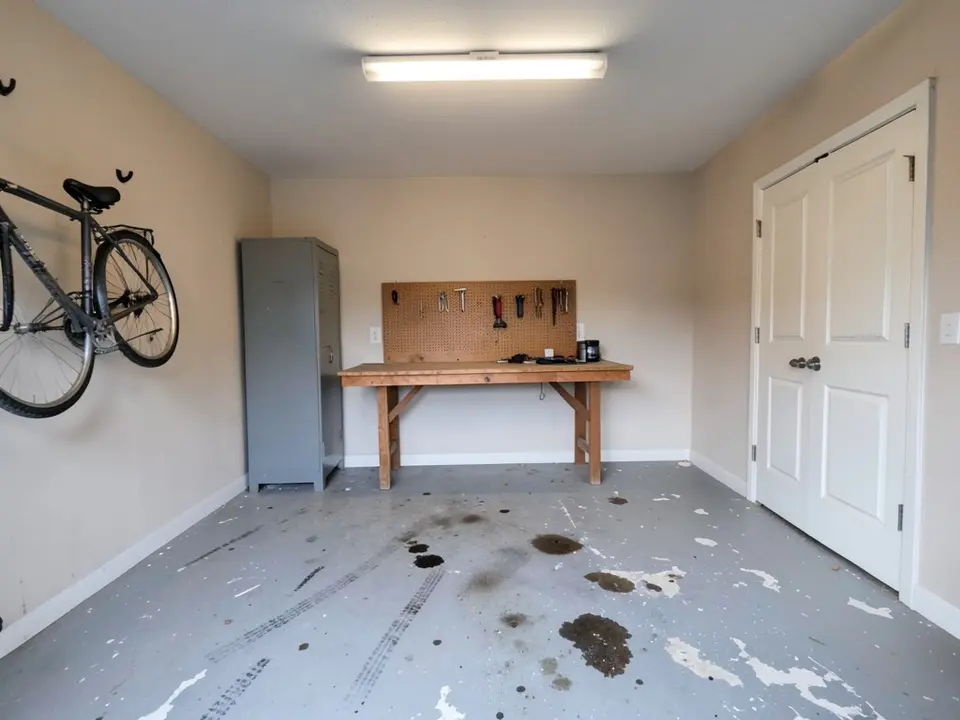 Before
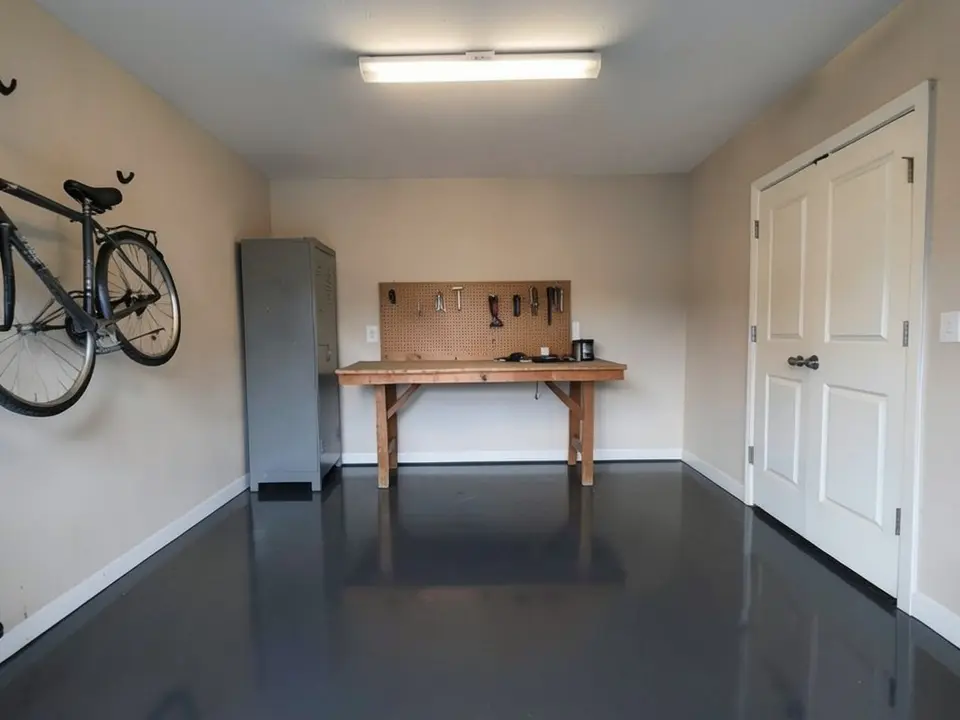 After
AfterHow to Try an Epoxy Color on Your Own Floor
The tool does not have a separate floor mode. You use the paint tool's Custom mode, where your own sentence becomes the instruction for the AI edit. That is what lets you name a flake blend or a metallic look and protect everything else in the room.
- Clear the floor and take one wide photo. Move the car out, push bins against the walls and stand in a corner or doorway so most of the slab is in view. Turn on every light and hold the phone level.
- Open the paint tool and choose Custom. Write the floor you want and what must not change, and upload the photo. For example: "coat only the concrete floor with a glossy full-flake epoxy in a gray, black and white blend, keep the walls, garage door, shelves and lighting the same". For a basement: "replace only the floor with a metallic epoxy in blue-gray and silver marble swirls, keep the stairs, walls and washer the same".
- Make three or four versions and compare. Change one thing at a time: flake blend, base color, gloss level. If a wall or a door changes, run it again and repeat the "keep" part of your instruction.
- Check the winner with real samples. Ask the installer or supplier for sample chips of your top two choices and lay them on the slab, under your own lights, in the morning and the evening.
Flake, Solid or Metallic: The Three Looks to Compare
Decide on the finish first, because it changes how a color reads far more than the color name does. A gray flake floor and a solid gray floor look like two different rooms.
Flake (chip) floors
Colored vinyl chips are broadcast into the wet base coat, either scattered or in full coverage, then sealed under a clear topcoat. Multi-color blends are the usual choice for working garages, because the pattern hides dust, drips and small flaws in the concrete.
Solid color
One pigmented color with a clean, uniform look, often gray, charcoal, tan or a light shade for workshops. It suits a tidy garage, a home gym or a showroom feel, and it is easy to add a border or parking lines in a second color. It shows dirt and scratches the most.
Metallic
Metallic pigments are worked by hand into swirls, clouds and a pearly depth. It is the most decorative look, common in basements and finished spaces. Every metallic floor is one of a kind, so any preview is only an idea of the mood.
Choosing an Epoxy Floor Color That Works in Real Life
- Think about what will land on it. Road salt, sand and dust are light; oil and tire marks are dark. A blend that mixes both light and dark flakes hides both. A floor that is all white or all black shows one of them right away.
- Gray is popular for a reason. Gray blends and mid grays go with white, gray or beige walls, with black or gray metal cabinets, and with almost any car. If you are unsure, render a gray blend first and use it as the baseline for every other idea.
- Light floors brighten a dark garage. A light gray or tan bounces more light around, which helps in a workshop or a garage with few windows. The trade-off is more visible dirt, so they suit spaces that are cleaned often.
- Match the fixed things. Cabinets, the garage door, wall paint and any brick or stone stay after the floor goes in. Pick a floor that works with them, or render the walls and floor together if you plan to change both.
- Basements play by different rules. A finished basement is a living space, so warmer tones, metallic looks and lighter colors are common there.
Planning to repaint the garage walls or a basement room at the same time? The AI paint visualizer covers wall colors, and the interior design tool can restyle a whole finished basement around the new floor.
What a Preview Can and Cannot Tell You
An AI render is good at one job: showing whether a style and a color family feel right in your space. It answers questions like "does a dark floor make our garage feel smaller?" or "does a busy flake blend clash with the cabinets?" long before anyone mixes material.
It cannot show the exact product. The AI invents the flakes, so their size, mix and spacing are approximate, and it has no access to any maker's color chart. The real color also depends on the base coat, the topcoat, the gloss level and the light in your garage: cool tubes, warm bulbs and afternoon sun can make one floor look like three.
It also cannot see the concrete. Moisture coming up through a basement slab, old sealers, oil soaked deep into the surface and cracks all affect whether a coating will last. A good installer checks these on site. Treat the render as the picture you bring to that conversation, and the physical sample chip as the final word on color.
Questions to Ask Before You Pick a Floor Coating
- How will the concrete be prepared? Grinding or shot blasting gives the coating something to grip; ask what they use.
- Will they test a basement slab for moisture first, and what happens if it fails?
- How will cracks, pits and the saw-cut joints be handled: filled, honored or covered?
- What topcoat goes over the color, and how does it hold up to hot tires, chemicals and sunlight near the door (plain epoxy can yellow in sun)?
- Can they add an anti-slip texture, and can you see a sample of it?
- Which exact flake blend or color code matches the render you liked, and can you keep a chip of it?
- How long before you can walk on it and park on it, and what does the warranty cover?
Costs vary a lot by region, floor size, the state of the concrete and the system you choose, so compare several written quotes for the same finish instead of relying on a general price per square foot.
Epoxy Floor Visualizer FAQ
What epoxy floor color looks best in a garage?+
There is no single best color, but many garages end up in a gray family: a gray, black and white flake blend, or a mid gray to charcoal solid. Gray works with white or gray walls, metal cabinets and most car colors. Tan and brown blends suit warm beige walls and wood. Pick two or three candidates, render each one on a photo of your own garage, then compare the real sample chips in that space.
Full flake or solid color: which hides dirt and tire marks better?+
Full flake usually hides more. A busy mix of light and dark flakes breaks up dust, salt, drips and tire marks, while one solid color shows almost every mark, especially in gloss. A solid floor looks clean and modern but needs more sweeping and mopping. Mid-tone blends tend to hide dirt best; very light or very dark floors show more.
Are flake floors slippery, or do I need a grip additive?+
Any glossy coating can be slippery when wet, and garages get wet from rain and snow. Flakes add a little texture but are not a non-slip finish on their own, so ask about an anti-slip aggregate mixed into the topcoat. Ask what they recommend and try a textured sample with your own shoes. The visualizer shows the look, not the grip.
Can I upload a picture of my own garage or basement?+
Yes, that is the point of the tool. Choose Custom in the paint tool, add a photo of your floor, and type what the new floor should look like and what must stay the same. It works for garages, basements, workshops, laundry rooms and other concrete floors.
How accurate is the epoxy floor visualizer?+
It is a preview of the look, not a product match. The AI draws flakes, swirls and gloss from your description, so flake size, spacing and exact shade are approximate, and real color changes with the product, the number of coats and your lighting. Use the renders to narrow down the style, then confirm the final choice with a physical sample chip in your own garage.
What finishes can I preview: flake, metallic, solid?+
All three, plus quartz-style and two-color looks, because you describe the finish in your own words. For example: "full-broadcast flake in gray, black and white", "metallic epoxy with blue-gray marble swirls" or "solid charcoal, high gloss, no flakes". You can also try a border or a painted parking line in a second color.
Can I share the mockup with a contractor?+
Yes. Download the render and send it with your quote request, or show it on your phone during the estimate. Send the photo of the current floor too, since the state of the concrete changes the prep work and the price.
Is the epoxy floor visualizer free, and do I need to sign up?+
You need a free account to generate. You can sign in with Google or with a one-time code sent to your email. New accounts in most countries get enough free credits for up to 2 renders, and free renders carry a small watermark. New accounts in India do not get free credits. Paid plans on the pricing page give more renders without the watermark.
Try Epoxy Colors on Your Floor
One photo, a few sentences, and a flake, solid or metallic floor to compare before you get quotes.