
AI Room Painter: See a New Wall Color in Your Own Room
Upload a photo of your room, name a wall color and see it painted on, before you buy a sample pot. Below are three before and afters, including where the AI did not follow the request.
Free account required. New accounts get 1 free render (watermarked), then paid plans.
Try it on your own photo
Upload a photo of your room taken in daylight. Name the wall color and say that the furniture, floor, curtains and baseboards stay exactly the same.
Open the full paint tool in Custom mode · Or use the interior mode
Room Painting, Before and After
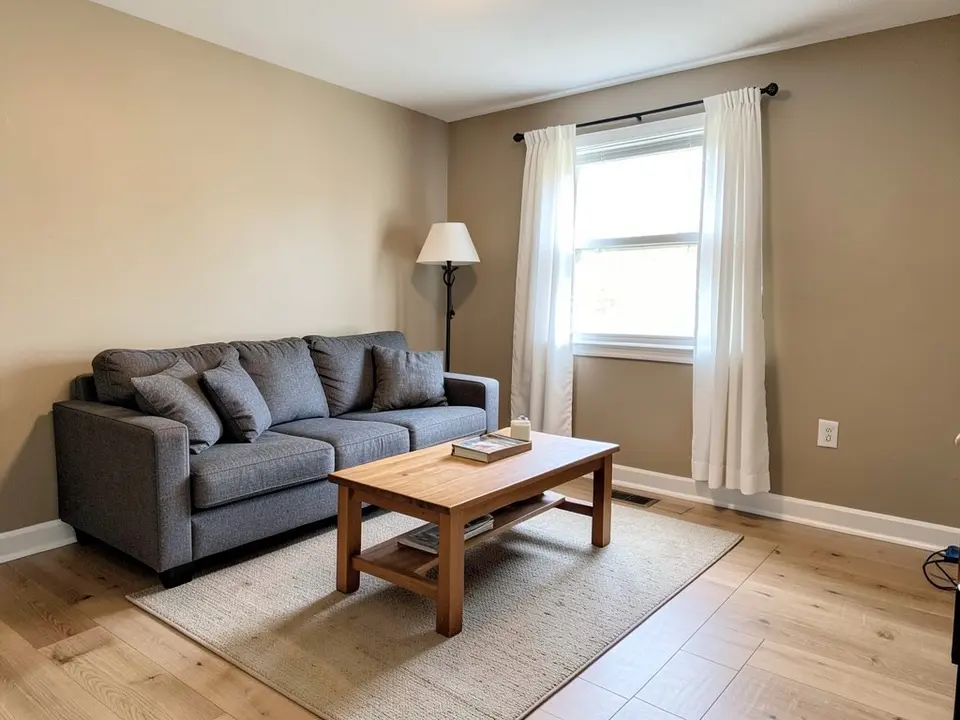
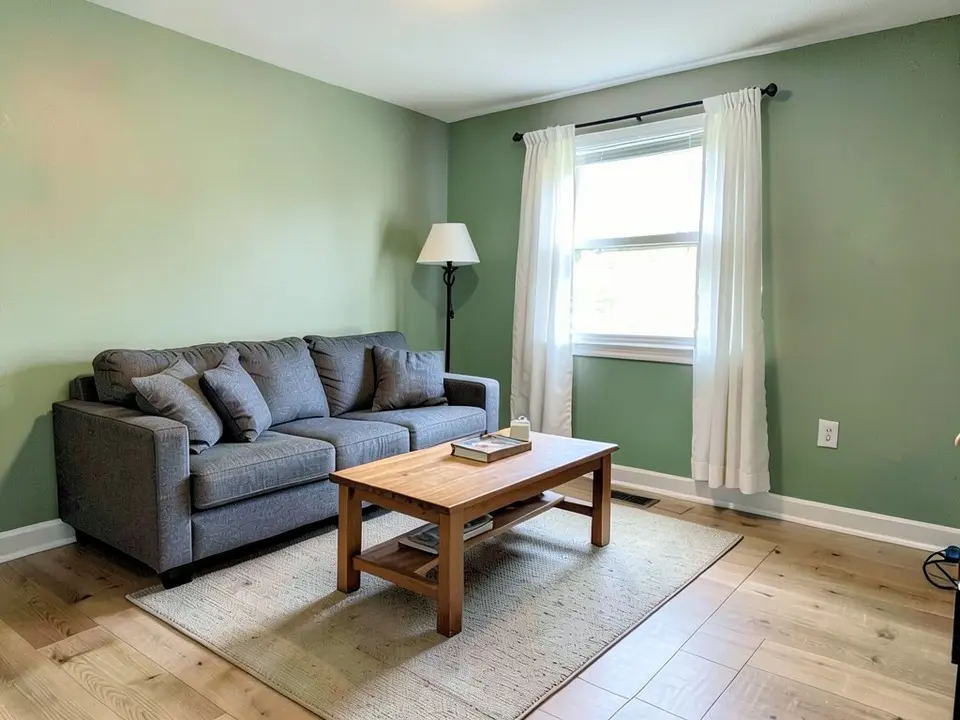
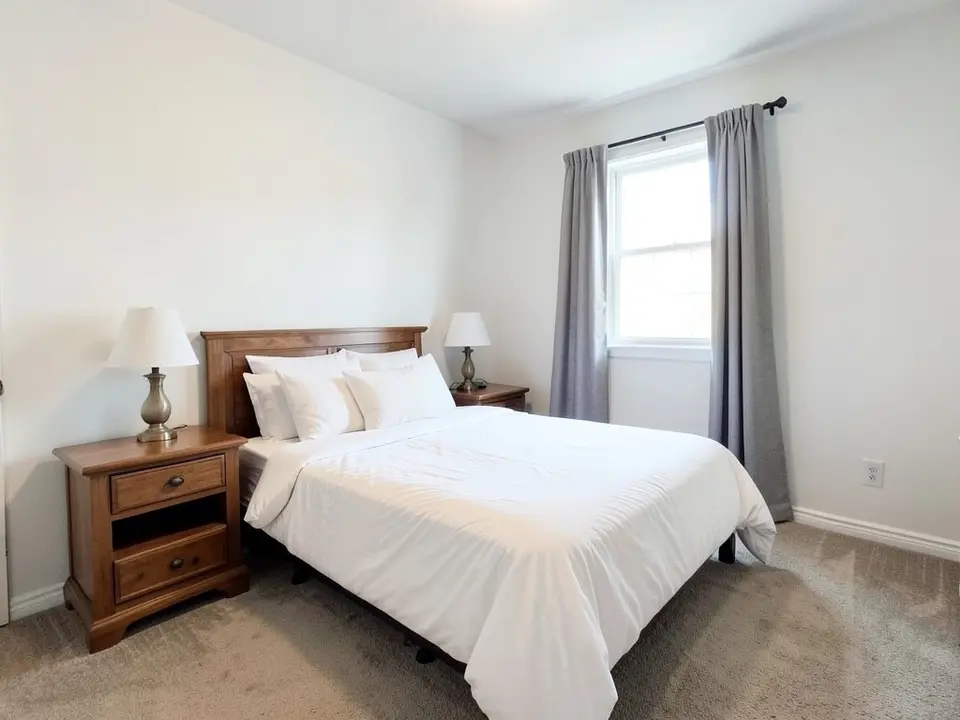
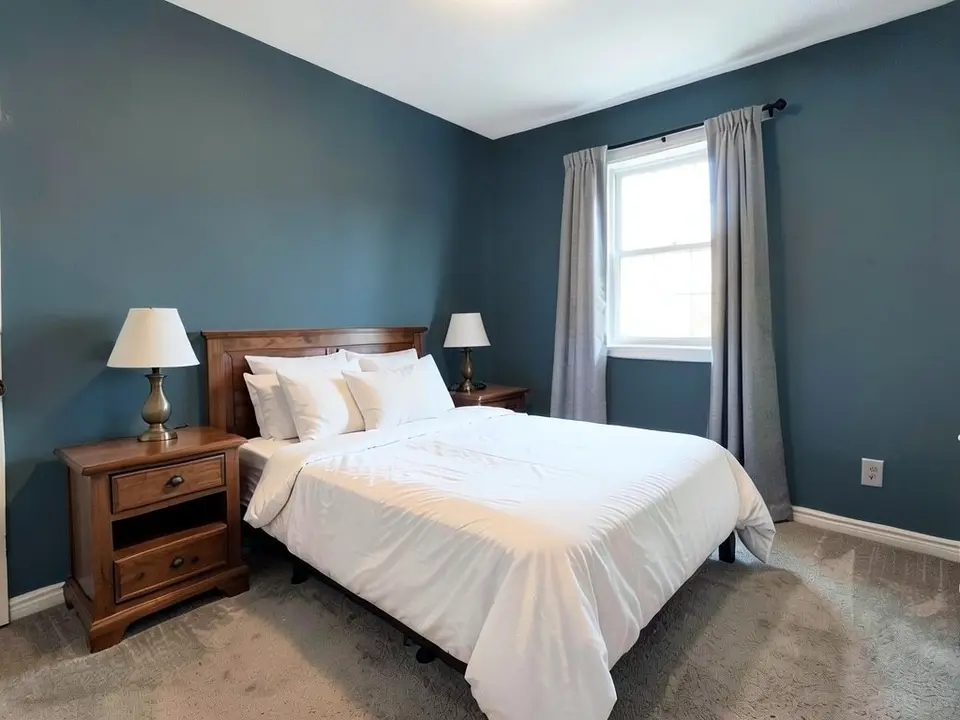
AI-generated sample edits of three rooms. The before photos are AI-drawn stand-in rooms, not photos of real homes, and the camera angle stays the same. The exact prompts are printed further down, and each caption says what the AI did not follow. The samples were run directly on our image model, so results through the tool can look different.
 Before
 After
 Before
 After
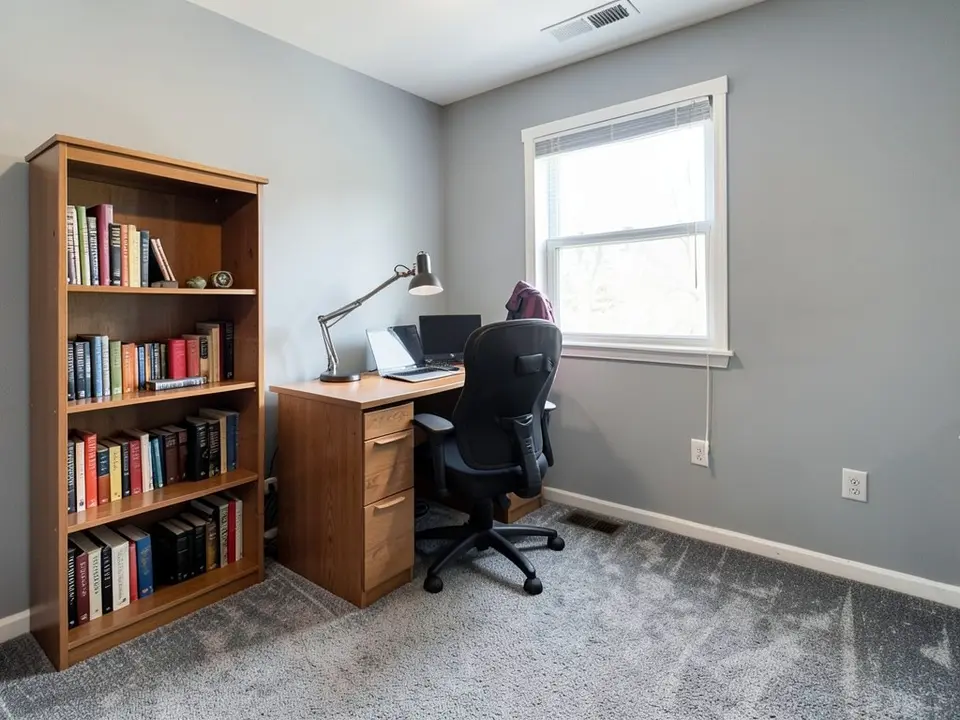 Before
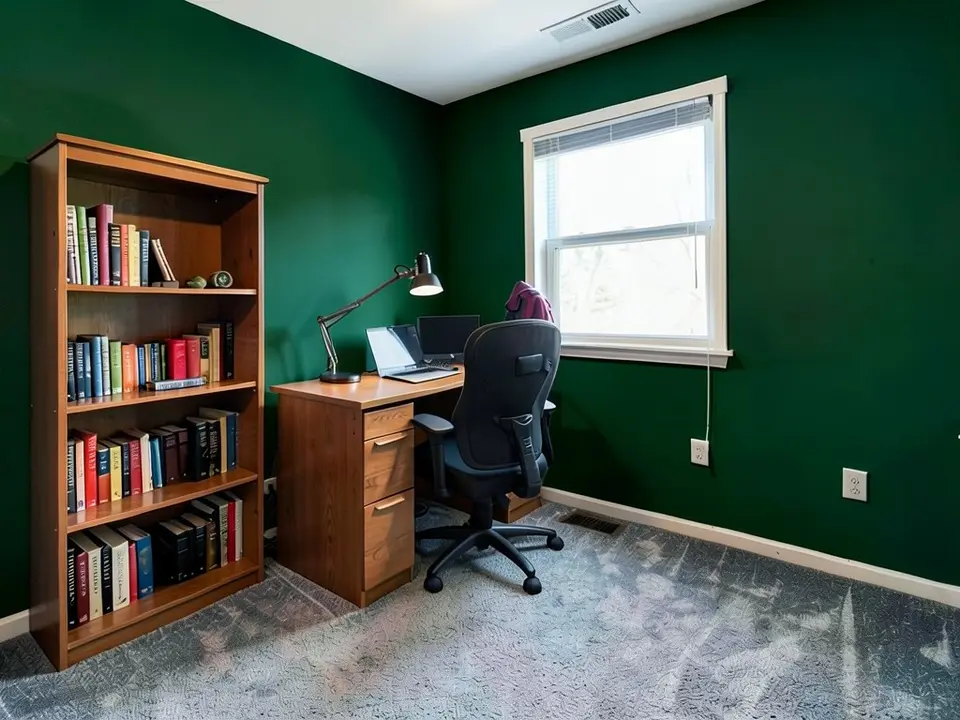 After
What an AI Room Painter Can and Cannot Do
It can
- Recolor the walls in your photo and keep the furniture, curtains and window as they are.
- Show a light, a mid and a dark color on the same room so you can narrow the list.
- Give you an image to show a partner or a painter.
It cannot
- Match a paint brand's chip. The color is whatever the model draws for your words.
- Show how your lamps and daylight will change the real color through the day.
- Be sure to leave everything else alone: in our samples floor and carpet textures shifted.
Before You Buy the Paint: What One Interior Color Guide Says
We cite one guide here, from the Redfin blog. Redfin is a real estate brokerage, so it has a stake in how homes look to buyers. Its advice, paraphrased:
- Light changes the color. Daylight moves through the day, warm and cool bulbs change how a color reads, and the direction a room faces matters too.
- Test with two coats. Check the sample in direct light and in shade, on more than one wall. Peel-and-stick samples can be moved around the room.
- Know the light reflectance value. Colors that reflect more light can brighten a small or dark room, and lower values feel cozier and more dramatic.
- Check the undertone. Decide whether a color leans warm, cool or neutral, and compare whites and trim with the wall color, since a warm white can look yellow beside a cool gray.
- Look at it from where you sit. View samples at eye level and from across the room, near corners, trim and large furniture, and live with your top picks for a few days.
Our advice, not the article's: use renders to choose two or three colors, then put real samples on the wall and look at them in the morning, in the evening and under your lamps before you buy gallons.
How to Paint a Room With AI, Step by Step
- Photograph the room. Stand in a corner so the walls you want to change are in view, in daylight, with the lights on and no one in the shot.
- Upload it above and describe one change. Name the wall color and how light or dark it should be. Then list what must stay: furniture, floor, curtains, window and baseboards.
- Check the whole image. Look at the floor, the carpet and the shadows, the places our samples slipped. Run it again with a clearer sentence if something changed that you did not ask for.
- Try two or three colors on the same photo. Then buy sample pots and test them on the wall.
The Exact Prompts Behind the Examples
These are the edit prompts for the three examples, word for word. Swap in your own colors and the list of what stays.
Prompt 1
Repaint only the beige walls a soft sage green. Keep the white baseboards, the sofa, the cushions, the coffee table, the rug, the lamp, the window, the curtains, the floor and the camera angle exactly the same
Prompt 2
Repaint only the white walls a dusty blue. Keep the bed, the bedding, the pillows, the nightstands, the lamps, the window, the curtains, the carpet and the camera angle exactly the same
Prompt 3
Repaint only the light gray walls a deep forest green. Keep the desk, the laptop, the lamp, the chair, the bookshelf, the books, the window, the carpet and the camera angle exactly the same
Source
- Redfin (real estate brokerage), Allie Drinkward, Choosing a Paint Color for Your Home: 6 Expert-Approved Tips That Work, March 23, 2026, redfin.com. Opened and paraphrased; none of its sentences or images are used.
AI Room Painter FAQ
What is an AI room painter?+
It is a tool that takes a photo of your room and shows it with a different wall color. You describe the color in words and an image model redraws the walls. It does not paint anything, and it is not a paint company or a contractor.
How do I use it on my own room?+
Take a photo of the room in daylight with the walls in view, upload it to the tool on this page, and write one sentence: the wall color you want and the list of things that must stay the same, such as the furniture, floor, curtains and baseboards. The prompts printed below are examples.
Will the render match the paint I buy?+
No. The render shows a color idea, not a paint chip, and in our bedroom sample the blue came out darker than the dusty blue we asked for. Redfin's paint guide suggests testing your top choices with two coats, in both direct light and shade, on several walls of the actual room.
Will it only change the walls?+
It should, if you say what stays, but it is an AI edit and not a mask. In our three samples the furniture stayed, while a floor or carpet texture shifted in all three. Look at the whole picture before you trust it.
Can it paint the ceiling, trim or an accent wall?+
Yes, if you ask for it. Name each surface and its color, and say which wall is the accent wall. For a ceiling or a trim color on its own, the ceiling and trim visualizers on this site are set up for that.
Does it pick a color for me?+
No. It shows the color you name. Rendering two or three colors on the same photo is a quick way to narrow the list before you buy sample pots.
Do I need to sign up?+
Yes. Rendering requires an account so your credits and results can be saved. You can sign in with Google or a one-time code sent to your email.
Is it free?+
Signing up is free and new accounts get 1 free render. Free renders carry a small watermark. More renders and clean images are on the paid plans on the pricing page.
Related Color Visualizers
- Interior paint visualizer – the whole room
- Wall paint colors – color ideas for walls
- Living room paint colors – ideas by style
- Ceiling paint colors – the fifth wall
- Accent wall visualizer – one bold wall
- Bedroom paint colors – calm color ideas
- AI house painter – exterior colors
- Cabinet paint color visualizer – cabinets
Paint Your Room Before You Buy the Paint
Upload one photo of your room and compare a light, a mid and a deep wall color.